

On this page
- 1What is email list hygiene?
- 2Why email lists decay
- 3The risks of a dirty email list
- 4Use double opt-in
- 5Verify email addresses in real time at signup
- 6Remove hard bounces and complaints automatically
- 7Sunset inactive subscribers
- 8Never buy or rent email lists
- 9How often to clean your email list
- 10Keep the list small and real
An email list starts aging the day you collect it. People change jobs, abandon old inboxes, lose interest or never meant to sign up in the first place. Nothing announces it: the addresses stay in your database, looking exactly like the good ones, until you send.
Then they show up as bounces, spam complaints and silence, and mailbox providers notice all three. This guide explains why lists decay, what a dirty list costs you, and the habits that keep a list clean without much ongoing effort.
What is email list hygiene?
Email list hygiene is the practice of keeping only real, reachable and interested people on your list. It is less a one-time cleanup than a set of filters at three moments: when an address arrives, after every send, and on a regular review of who still cares.
It matters because mailbox providers like Gmail, Yahoo and Outlook judge you on how your recipients react. A list full of dead addresses and people who never open sends them a clear signal: this sender does not know who they are mailing.
Why email lists decay
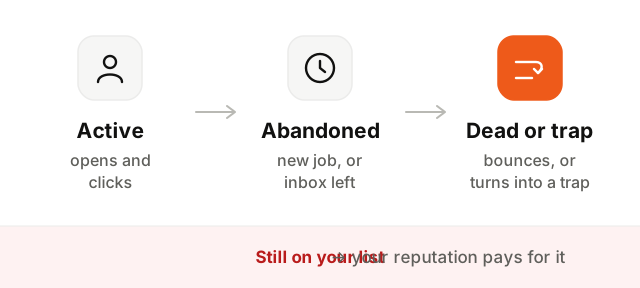
Addresses go bad for ordinary reasons:
- Job changes. For a B2B product, this is the big one. When someone leaves a company, their work address is closed and starts to hard bounce, or is forwarded to someone who never signed up.
- Abandoned inboxes. People create a new personal address and stop reading the old one. Some providers delete long-inactive accounts: Google started removing personal accounts unused for two years in December 2023.
- Typos at signup.
jon@gmial.comwas never going to work, and some misspelled domains are run as traps on purpose. - Fake and throwaway signups. Bots, disposable addresses created to get a download, or people typing anything to get past a form.
- Lost interest. The address is fine, but the person stopped reading. To a mailbox provider, a growing pile of unread email looks a lot like spam.
The risks of a dirty email list
| Problem | What happens | Why it hurts |
|---|---|---|
| Hard bounces | The address does not exist | A high bounce rate is a classic sign of a poorly kept list |
| Spam traps | Mail reaches an address no person reads | One hit can get you blocklisted or filtered |
| Low engagement | People receive but never open or click | Providers start routing your mail to spam, even for engaged readers |
| Spam complaints | Forgotten subscribers press "report spam" | The strongest negative signal there is |
| Wasted spend | You pay to email nobody | Many tools price by contacts or sends |
Spam traps deserve a word. Some are addresses that were never used by a person, published where only scrapers would find them. Others are recycled: old abandoned addresses that a provider reactivated to catch senders still mailing them years later. Neither can be spotted by looking at the address. The only defense is collecting addresses properly and removing the ones that stop responding.
All of this feeds your sender reputation, which decides whether your next email, including the one to your best customer, reaches the inbox.
Use double opt-in
With double opt-in, a new subscriber receives a confirmation email and only joins your list after clicking the link in it. Single opt-in adds them as soon as the form is submitted.
Double opt-in costs you some signups, the people who never click. In exchange, every address on your list is real, typed correctly and owned by someone who wanted your email. Typos, bots and pristine spam traps never get in, and you have a record of consent that consent laws in the EU and elsewhere may expect you to keep.
For product signups, where people must confirm their address to use the account anyway, the confirmation step already does this job for your users.
Verify email addresses in real time at signup
Before anything is sent, check the address at the form. A good check looks at:
- Syntax: an
@, a valid domain, no spaces or forbidden characters. - The domain: does it exist, and does it have MX records to receive mail?
- Common typos: suggest
gmail.comwhen someone typesgmial.com. - Disposable domains: throwaway inbox services built to be used once.
- Role addresses:
info@,support@,sales@, read by several people or nobody.
Try it on any address:
Role addresses and disposable domains
Disposable addresses are worth blocking outright for a newsletter or a trial signup: they exist to receive one email and vanish. Role addresses are more nuanced. A shared team@ may be the right contact for a small company, but nobody personally agreed to your newsletter there, and complaints from shared inboxes are common. Many senders accept them for product accounts and leave them out of marketing.
Remove hard bounces and complaints automatically
This is the one rule with no exception. After a hard bounce, never send to that address again. After a spam complaint, stop sending marketing to that person at once, and in most cases everything except what they strictly need.
A good email platform does this for you, through a suppression list checked before every send. Check that yours does, and that the suppression covers every tool you send from: an address that bounced in your marketing tool should not keep receiving from a script someone wrote last year.
Soft bounces, like a full mailbox or a temporarily unavailable server, deserve patience. Retry them, and suppress an address only when it keeps soft bouncing over several consecutive sends.
Sunset inactive subscribers
A sunset policy decides when an unengaged subscriber stops receiving your regular email. It is the hardest hygiene habit, because it means shrinking your list on purpose. It is also the one that most improves how providers see you.
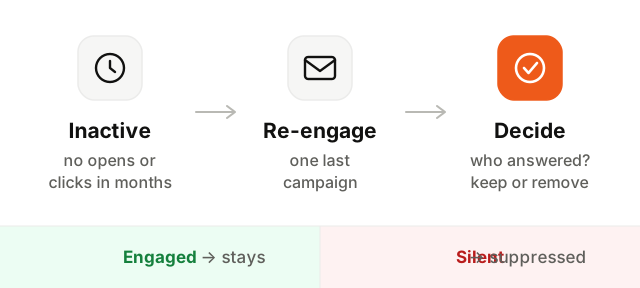
- 1Define inactive. Pick a window that fits how often you send, for example no click and no open in six months for a weekly newsletter. Count clicks and replies, not just opens, since some mail apps load images automatically and fake an open.
- 2Send a re-engagement campaign. One or two short emails: ask whether they still want to hear from you, make staying a single click, and make leaving just as easy.
- 3Keep those who respond. A click is a clear yes. Move them back to your regular sends.
- 4Suppress the rest. Stop sending to subscribers who stayed silent. Keep them on a suppression list rather than deleting them, so a later import does not bring them back.
Never buy or rent email lists
A bought list is the fastest way to ruin a sending domain. The addresses are often old, scraped or collected by someone else under conditions you know nothing about. They contain bounces and spam traps in quantities your own signups never would, and the people on them never agreed to hear from you.
In the EU, the UK and Canada, mailing people without their consent can break the law, and most email platforms forbid purchased lists in their terms. Grow the list from your product, your content and your own signup forms. It is slower and it is the only version that works.
How often to clean your email list
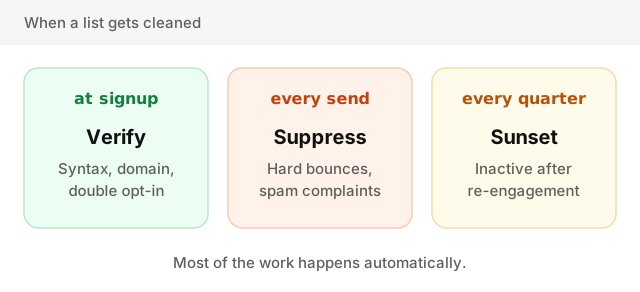
- At signup, always: verification and double opt-in keep bad addresses out.
- After every send, automatically: hard bounces and complaints go to the suppression list.
- Every quarter: review inactive subscribers and run your sunset policy.
- Before a big send or after a long pause: if you have not emailed a segment in months, clean it and send to the most engaged part first. A sudden send to an old list is how dormant problems surface all at once.
Keep the list small and real
A clean list is not a smaller version of your audience, it is the real one. Verify at the door, remove what bounces, ask the quiet ones once, and let go of the rest.
To go further, see what a healthy email bounce rate looks like, how sender reputation is built, and the wider email deliverability guide. Before you send, make sure your domain is authenticated with the SPF, DKIM and DMARC checker.