

On this page
- 1What is email sender reputation?
- 2Domain reputation vs IP reputation
- 3What builds and damages sender reputation
- 4Spam traps: pristine and recycled
- 5How to check your sender reputation
- 6How to warm up a new domain or IP
- 7Separate marketing and transactional email
- 8How to recover from a bad sender reputation
- 9Keep going
Every time you send an email, the receiving provider asks a quick question before it reads a word: do we trust this sender? The answer comes from your sender reputation, a running score built from everything your past mail has done. It is the main reason two identical emails from two different companies can land in two different folders.
This guide explains what sender reputation is made of, the difference between domain and IP reputation, what builds and damages it, how to check it, and how to warm up a new domain or climb back from a bad score.
What is email sender reputation?
Sender reputation is how much a mailbox provider like Gmail or Outlook trusts mail from you. Each provider keeps its own score, based on how its own users reacted to your past mail. There is no single, universal number, and providers do not publish their formulas.
What they all share is the logic. Mail that people want, open and reply to raises your reputation. Mail that bounces, gets reported as spam or hits traps lowers it. A good reputation earns you the inbox; a poor one gets you the spam folder, then outright rejection.
Domain reputation vs IP reputation
Providers score two things separately: the domain in your email (mainly the From domain and the DKIM signing domain) and the IP address of the server that delivered it.
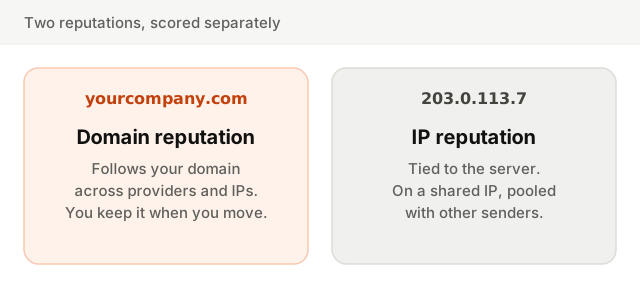
Domain reputation has become the more important of the two. It follows you everywhere: change email provider and your domain's history comes along. That is also why authentication matters so much. DKIM and DMARC are what let a provider tie a message to your domain with certainty.
IP reputation depends on how you send. On a shared IP, your mail goes out alongside other senders' and the reputation is pooled: a good provider keeps the pool clean, a careless one does not. On a dedicated IP, the reputation is yours alone, which helps only if you send enough steady volume to build one.
What builds and damages sender reputation
| Signal | Builds reputation | Damages reputation |
|---|---|---|
| Spam complaints | Rarely reported, well under 0.1% | Above 0.1%, and especially above 0.3% |
| Bounces | Low, hard bounces removed at once | Repeated sends to dead addresses |
| Spam traps | None hit | Any hit, especially pristine traps |
| Engagement | Opens, replies, moved out of spam | Deleted unread, never opened |
| Volume | Steady, growing gradually | Sudden spikes, long silences then bursts |
| Authentication | SPF, DKIM and DMARC aligned | Missing or failing records |
Complaints weigh the most. A recipient clicking "Report spam" is the clearest negative signal a provider gets, and Gmail and Yahoo require bulk senders to stay below a 0.3% spam rate. Engagement works the other way: when people open, reply or rescue your mail from spam, the provider learns that its users want it.
Spam traps: pristine and recycled
A spam trap is an address run by a provider or a blocklist operator to catch bad sending practices. Nobody reads it, so mail to it proves something about how you built your list.
- Pristine traps were never used by a real person. They are published where only scrapers find them. Hitting one means you mailed addresses that never signed up, and blocklists treat it seriously.
- Recycled traps were real addresses once. After being abandoned and bouncing for a long period, they were turned into traps. Hitting one means you keep mailing people who left long ago.
You cannot spot a trap by looking at it. The only defense is collecting addresses with consent and removing contacts who stopped engaging. A related problem is typo traps, misspelled domains like gmial.com, which double opt-in catches.
How to check your sender reputation
Google Postmaster Tools is the essential one. Verify your domain to see your spam rate, whether you meet Gmail's sender requirements, authentication results and delivery errors. Google retired its old domain and IP reputation dashboards (the High, Medium, Low and Bad ratings) with the current version of the tool, so the spam rate is now the number to watch.
Microsoft SNDS shows how Outlook.com treats the IP addresses you send from: a green, yellow or red status, complaint rates and trap hits. It needs IPs you control, so it is mostly useful on dedicated IPs.
Blocklists like those run by Spamhaus list IPs and domains that sent spam or hit traps. Many providers consult them, so a listing can cause blocks across the board. Look up your sending domain and IPs, and if you are listed, the operator's site explains the cause and the removal process.
Your own numbers fill the gaps: complaint rate, bounce rate and engagement, split by mailbox provider. A drop at one provider only points to a reputation problem with that provider.
How to warm up a new domain or IP
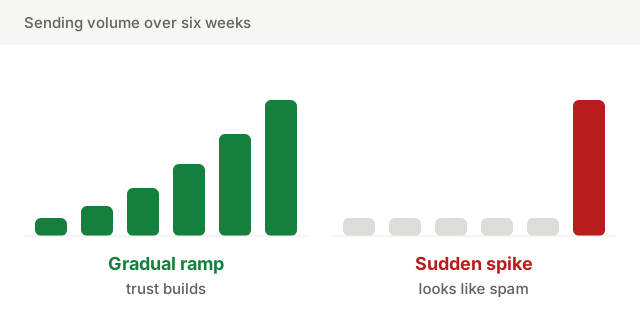
A new domain or IP has no reputation, which providers treat with suspicion. Warming up means building a track record gradually, so the first big send does not look like a spammer's.
- 1Authenticate first. SPF, DKIM and DMARC must pass before the first email. Check them below.
- 2Start with your most engaged contacts. People who opened or clicked recently are the most likely to react well, and good reactions are what build the reputation.
- 3Increase volume gradually. A common approach is to raise volume step by step over a few weeks rather than sending to the full list on day one.
- 4Watch complaints and bounces at every step. If either rises, hold the volume or step back until it settles.
- 5Keep a steady rhythm afterwards. Regular sending keeps the reputation. A long silence followed by a huge send undoes the work.
Separate marketing and transactional email
Marketing campaigns carry more risk: they go to more people, some of whom forgot they signed up. Transactional email (receipts, password resets, login codes) is expected and opened. Mixing them means a campaign that draws complaints can push your password resets into spam.
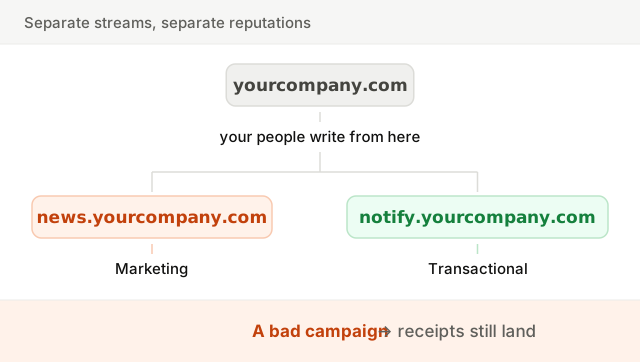
Send each stream from its own subdomain, such as news.yourcompany.com for marketing and notify.yourcompany.com for transactional mail, each with its own authentication, and ideally through separate IPs or pools. Providers will still see the parent domain, so this limits damage rather than hiding it. More in transactional vs marketing email.
How to recover from a bad sender reputation
- 1Find the cause. Check when it started and what changed: a new segment, an import, a DNS change, a different kind of campaign.
- 2Fix authentication. Failing SPF, DKIM or DMARC makes everything else harder.
- 3Cut the list down to engaged contacts. Send only to people who opened or clicked recently. Suppress bounces, complaints and long-inactive contacts.
- 4Reduce volume, then rebuild. Send less, to the best part of your list, and increase gradually as with a warm-up.
- 5Request delisting from any blocklist once the cause is fixed.
- 6Send what people want. Clear subject lines, content they signed up for, an easy way out. Run copy through the spam words checker to catch the obvious mistakes.
Keep going
Reputation sits at the center of email deliverability, and most of it comes down to list quality. Keep bounces low with the bounce rate guide and the email checker, clean out the inactive with email list hygiene, and if mail is already landing in spam, start with how to avoid the spam folder.