

On this page
- 1Why emails land in spam
- 21. Authenticate your domain
- 32. Protect your sender reputation
- 43. Earn engagement
- 54. Keep spam complaints low with easy unsubscribes
- 65. Keep your list clean
- 76. Write content that does not look like spam
- 87. Send at a steady volume
- 9Checklist: how to avoid the spam folder
- 10Keep going
Most advice about the spam folder starts with a list of forbidden words. That is backwards. Mailbox providers like Gmail, Outlook and Yahoo decide where an email goes mostly on who sent it and how their readers have reacted to that sender before. The words inside come last.
This guide goes through the real reasons emails land in spam, roughly from heaviest to lightest, and ends with a checklist you can work through in an afternoon.
Why emails land in spam
A spam filter does not read your email the way a person does. It collects signals and adds them up: is this sender who they claim to be, have they sent good mail before, do people open, reply or complain, are these addresses real, and does the content look like known spam?
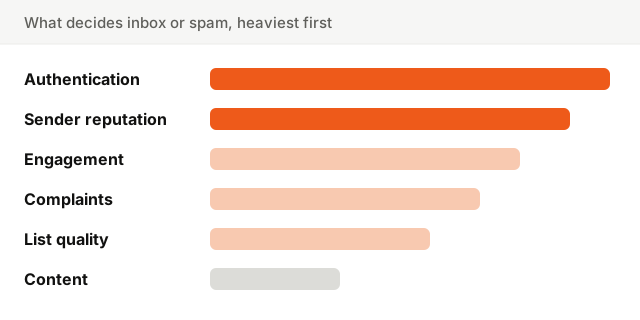
The order matters. A perfectly written email from an unauthenticated domain with a poor reputation goes to spam. A plain email with a pushy subject line from a trusted, well-liked sender usually reaches the inbox. Fix things from the top.
1. Authenticate your domain
Authentication proves that an email really comes from your domain. It is the entry ticket, and since February 2024, Gmail and Yahoo require it from anyone sending in volume.
- SPF lists the servers allowed to send for your domain.
- DKIM signs each email so receivers can check it was not altered.
- DMARC ties both to the From address and tells receivers what to do when they fail.
Send from your own domain, not a free mailbox address, and make sure the domain in your From line passes DMARC. Check all three in one go with the Deliverability Setup Checker.
2. Protect your sender reputation
Mailbox providers keep a running score for your sending domain and the IP addresses you send from. Every email you send adds to it or takes from it. Your sender reputation is the sum of everything below: bounces, complaints, engagement, spam trap hits.
Reputation is slow to build and quick to lose. One large send to an old, unvetted list can undo months of good behavior. If you send both product notifications and marketing, consider sending marketing from a subdomain such as news.yourcompany.com, so a bad campaign cannot drag down your password resets.
3. Earn engagement
Gmail and others watch what recipients do with your emails: open, reply, move to a folder, mark as "not spam", or delete without reading. Positive actions tell the filter people want your mail. Ignored emails, sent again and again, tell it the opposite.
You cannot fake engagement, but you can stop sending to people who never engage. That is the single most effective lever on this list, and it ties directly into list quality below.
4. Keep spam complaints low with easy unsubscribes
When someone clicks Report spam, it is the strongest negative signal there is. Gmail asks bulk senders to keep their spam rate below 0.1% and never let it reach 0.3%.
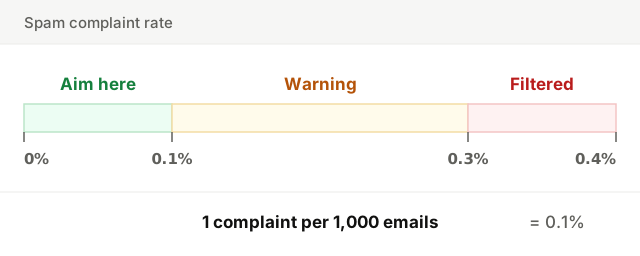
People report spam when they do not remember signing up, cannot find the unsubscribe link, or get more email than they expected. So:
- Send only to people who opted in, and remind them why they hear from you.
- Make the unsubscribe link easy to find. A reader who cannot leave will report you instead.
- Send at the rhythm you promised at sign-up.
You can see the rate Gmail measures for your domain in Google Postmaster Tools, once your domain is verified there. It only counts complaints from Gmail users whose email was delivered to the inbox, so check it after every large send rather than once a quarter.
One-click unsubscribe is part of the same picture. Since 2024, Gmail and Yahoo require bulk senders to include a List-Unsubscribe header with one-click support in marketing emails, and to honor the request within two days. It appears as an "Unsubscribe" link next to your sender name, at the top of the email. That works in your favor: a reader who wants out and finds an easy exit unsubscribes, while a reader who cannot find one reports spam.
5. Keep your list clean
Sending to addresses that do not exist produces hard bounces, and a high bounce rate tells providers you do not look after your list. Old addresses can also become spam traps: abandoned mailboxes that providers turn into traps to catch careless senders.
- Validate addresses at sign-up, and use double opt-in where it fits. You can check a single address with the Email Checker.
- Remove hard bounces immediately and never retry them.
- Sunset contacts who have not engaged in months, after one re-engagement attempt.
Our list hygiene guide covers this in detail.
6. Write content that does not look like spam
Content comes last, but it still counts, especially for a new sender with little reputation. The patterns that hurt:
| Pattern | Why it hurts | What to do instead |
|---|---|---|
| Spam trigger words ("act now", "100% free", "risk-free") | Common in junk mail, and readers distrust them too | Say plainly what the email offers |
| Subject in capitals, stacked exclamation marks | A classic spam signature | Write in sentence case, one mark at most |
| One big image, little text | Hides the content from filters, breaks with images off | Keep a real text body, use images to support it |
| URL shorteners | Often used to hide malicious links | Link to your own domain |
| Attachments | A common way to spread malware | Link to the file on your site |
| Misleading subject lines ("Re:", fake urgency) | Annoys readers, drives complaints, and is illegal in some countries | Make the subject match the content |
Run your subject line and body through the checker below. It flags the trigger words and patterns, explains why each one reads as spam, and suggests a plainer way to say it.
7. Send at a steady volume
Filters are suspicious of sudden spikes. A domain that sends 500 emails a week and suddenly sends 50,000 looks like a compromised account or a spammer.
- Warm up a new domain by starting with your most engaged recipients and increasing volume over a few weeks.
- Keep a regular rhythm. Weekly or monthly, but predictable.
- Spread very large sends over hours rather than seconds.
Checklist: how to avoid the spam folder
- 1Authenticate. SPF, DKIM and DMARC all pass, and the From domain aligns with DMARC.
- 2Send from your own domain, with marketing on a subdomain if you also send product emails.
- 3Send only to people who opted in, and remind them why they are hearing from you.
- 4Remove hard bounces and unengaged contacts regularly.
- 5Watch your complaint rate: below 0.1%, never near 0.3%.
- 6Add one-click unsubscribe and keep a visible unsubscribe link in the footer.
- 7Write clearly: no capitals, no fake urgency, no shorteners, no attachments.
- 8Keep volume steady, and warm up any new domain gradually.
- 9Test before you send: check your copy, and send yourself a test to several inboxes.
Keep going
Getting into the inbox is mostly about trust, built one send at a time. Start with the setup, then protect it with a clean, willing list.
For the bigger picture, read our guides to email deliverability and sender reputation. To measure whether your emails are landing, see email open rate and click-through rate. And check your domain setup now with the Deliverability Setup Checker.