

On this page
Anyone can put your domain in the From line of an email. Nothing in the email protocol itself stops them. SPF is the first answer to that problem: a list, published in your DNS, of the servers that are allowed to send email for your domain. Inboxes read it, and an email from a server that is not on the list starts out suspicious.
This guide explains how SPF works, how to read an SPF record line by line, the limit that quietly breaks so many of them, and how to set one up properly.
What is SPF?
SPF (Sender Policy Framework) is an email authentication standard. It is a single TXT record on your domain that lists every server allowed to send email on its behalf: your mailbox provider, your newsletter tool, the service your app uses for password resets.
When an email arrives, the receiving server checks the address of the server that delivered it against that list. If the server is listed, SPF passes. If it is not, SPF fails, and the email is more likely to be filtered as spam or rejected.
Think of it as the guest list at the door. It does not say anything about what the guests do inside, only who is allowed in.
How SPF works
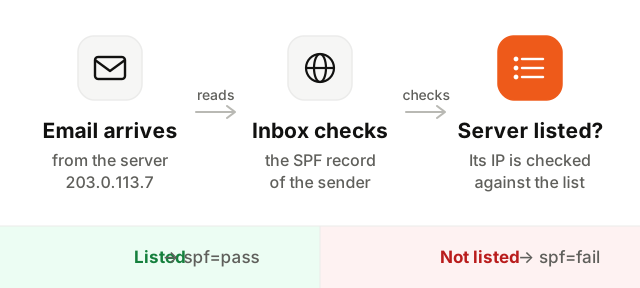
- 1An email arrives. The receiving server notes the IP address of the server that delivered it, and the domain of the envelope sender, also called the Return-Path.
- 2It looks up the SPF record. It reads the TXT record starting with
v=spf1on that domain. - 3It walks the list. It checks each rule in order, following any
include:to the SPF records of the services you use, until one matches the sending IP. - 4It records the result.
spf=passif the server is listed,failorsoftfailif not, and an error if the record is broken. The result is written in theAuthentication-Resultsheader of the email.
How to read an SPF record
An SPF record is a line of rules, read from left to right.
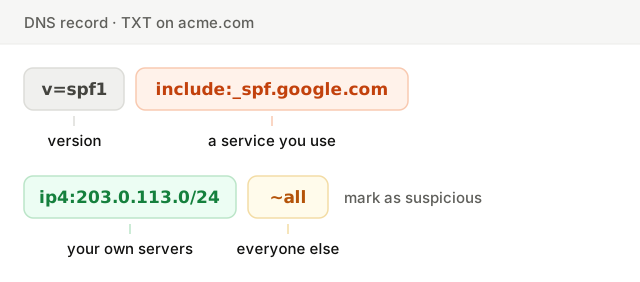
The parts you will meet most often:
| Part | What it means |
|---|---|
v=spf1 | Opens every SPF record. Without it, the record is ignored. |
include: | Allows the servers of another service, by reading its own SPF record. This is how most email tools are added. |
ip4: / ip6: | Allows a specific address or range, for servers you run yourself. |
a / mx | Allows the servers your domain points to, for your website or your incoming mail. |
redirect= | Uses another domain's SPF record instead of this one. |
~all / -all | Closes the record: what to do with every server not listed. |
The last part matters more than it looks. ~all (soft fail) marks unlisted senders as suspicious, -all (hard fail) asks receivers to reject them, ?all takes no position and protects nothing, and +all allows every server on the internet to send as you. Never use the last two.
The SPF 10 DNS lookup limit
This is the error that breaks the most SPF records, usually without anyone noticing. To check an email, a receiving server is allowed at most 10 DNS lookups. Every include:, a, mx, exists and redirect counts as one, and so do the includes inside each include.
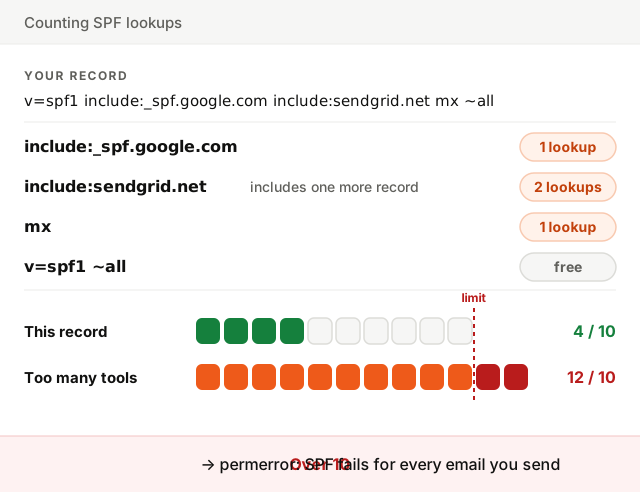
Add a few email tools over the years and you pass 10 without seeing it. Past the limit, receivers return a permerror, and SPF fails for every email you send, even from the services that are listed.
To get back under 10:
- Remove the services you no longer use. Old newsletter tools and forgotten CRMs are the usual culprits.
- Replace an include with its IP ranges, when the service publishes stable ones. This is called flattening; it saves lookups, but you have to update the ranges if the service changes them.
- Move a sending service to a subdomain like
news.yourcompany.com, with its own SPF record and its own 10 lookups.
How to set up SPF
- 1List every service that sends email as your domain. Your mailbox provider, marketing tool, transactional email service, CRM, help desk. Each one documents the
include:it needs. - 2Write one record. Start with
v=spf1, add each service'sinclude:, and end with~all. For example:v=spf1 include:_spf.google.com include:sendgrid.net ~all. - 3Add it to your DNS as a TXT record on your domain (the name is often
@). If an SPF record already exists, edit it; never create a second one. - 4Check it. Make sure the record is found, valid, and under 10 lookups.
Many sending services ask for a custom Return-Path (or bounce domain), like bounces.yourcompany.com, with its own SPF record. Set it up: it makes SPF pass for your own domain instead of the provider's, which is what DMARC needs.
How to check your SPF record
Enter your domain below. The checker reads your SPF record, counts its DNS lookups, nested ones included, and explains every part of it.
On a real email, open the original message (in Gmail: the three dots, then Show original). The summary at the top shows SPF: PASS with the IP address that was checked, and the Authentication-Results header shows spf=pass or spf=fail with the domain it was checked for.
Common SPF errors
- Two SPF records. The most common mistake: a new tool asks you to add an SPF record and you create a second one. Receivers treat two records as an error. Merge them into one.
- Over 10 lookups. SPF fails everywhere with a permerror. Count your lookups, nested includes included.
- No
allat the end. The record lists who may send but says nothing about everyone else. End it with~all. +allor?all. The first lets anyone send as you, the second protects nothing.- A typo in an include. An include pointing to a domain without an SPF record is an error for receivers. Copy includes exactly as your provider gives them.
- The deprecated
ptrmechanism. It is slow, unreliable, and some receivers ignore it. Replace it withip4:ranges or the include your provider offers. - Forgetting a subdomain. SPF is not inherited: a subdomain that sends needs its own record.
SPF, DKIM and DMARC together
SPF says which servers may send for your domain. DKIM signs each email, proving it came from you and was not changed, and its signature survives forwarding where SPF does not. DMARC ties both to the From address people actually see, and tells receivers what to do when they fail.
Since February 2024, Gmail and Yahoo expect all three from anyone sending in volume. Check the whole setup at once with the Deliverability Setup Checker.