

On this page
- 1What is an email API?
- 2Email API vs SMTP relay vs marketing platform
- 3How an email API works
- 4Email API examples: curl and Node.js
- 5Delivery events and webhooks
- 6Retries, idempotency and rate limits
- 7Domain authentication for an email API
- 8How to choose an email API provider
- 9Email API security: keeping keys safe
- 10Where to go next
Your product sends email whether you planned it or not. A signup needs a confirmation, a payment needs a receipt, a forgotten password needs a reset link. Somewhere in your code there is a line that has to say "send this email to this person, now", and an email API is what that line talks to.
This guide explains what an email API is, how a send travels from your code to an inbox, and the parts that separate a working integration from a fragile one: delivery events, idempotency, rate limits and domain authentication. The examples are real requests you can adapt.
What is an email API?
An email API is a web service that sends email on behalf of your application. Your code makes an HTTPS request: who the email is for, what it says, and an API key that proves the request comes from you. The provider takes it from there. It builds the message, signs it for your domain, hands it to the recipient's mail server, retries when that server is busy, and tells you what happened.
You could run your own mail server instead. Few products do, because the hard part of email is not sending, it is being trusted, and an email API rents you that work.
Email API vs SMTP relay vs marketing platform
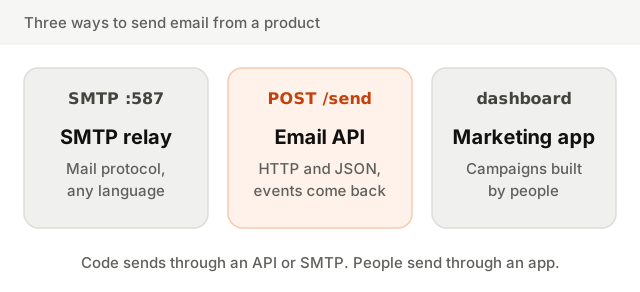
There are three common ways for a product to send email, and they solve different problems.
| SMTP relay | Email API | Marketing platform | |
|---|---|---|---|
| Who sends | Your code or any mail-capable software | Your code | A person in a dashboard, or an automation |
| How | The SMTP protocol, usually on port 587 | An HTTPS request with JSON | Campaign editor, lists, segments |
| Errors | Numeric SMTP codes, sometimes late | Structured JSON, at once | Shown in reports |
| Events back | Rarely, or through a separate system | Webhooks or a status endpoint | Built into reports |
| Best for | Legacy apps, devices, tools that only speak SMTP | Receipts, resets, notifications | Newsletters, launches, nurture sequences |
SMTP relay is the original way, and almost everything supports it. But errors are terse and nothing tells you later that the email bounced. An email API wraps the same delivery in one HTTP call that answers with a message id and pushes events back. A marketing platform is for people, not code. Most SaaS products end up using an API for the email their code triggers and a marketing tool for everything else. The line between the two is the subject of transactional vs marketing email.
How an email API works
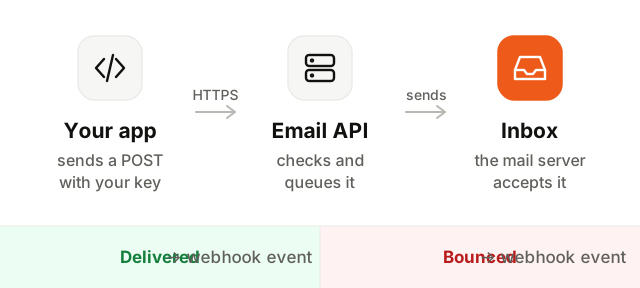
- 1Your code authenticates. Every request carries your API key, usually in an
Authorization: Bearerheader. The key identifies your account and decides what the request is allowed to do. - 2It sends an HTTP request. A
POSTwith a JSON body: the recipient, a subject and HTML, or a template id with variables to fill in. - 3The API checks and queues it. It validates the fields, refuses addresses known to bounce, renders the template, and puts the email in a queue. You get a message id back within moments.
- 4The provider delivers it. It signs the email with DKIM for your domain and connects to the recipient's mail server. If that server says "try later", the provider retries for you.
- 5Events come back. Delivered, bounced, opened, clicked or marked as spam: each one arrives later, as a webhook or through a status endpoint.
The important detail is in step 3. A successful response does not mean the email arrived. It means the provider accepted it, or that it left. Whether the recipient's server took it is only known seconds or minutes later, which is why events matter.
Email API examples: curl and Node.js
The examples below use Fromly's transactional endpoint, which works like most email APIs. The shape is the same elsewhere: a URL, a bearer key, a JSON body.
curl -X POST https://api.fromly.io/v1/transactional \
  -H "Authorization: Bearer $FROMLY_API_KEY" \
  -H "Content-Type: application/json" \
  -d '{
    "to": "ada@example.com",
    "emailId": "<template id>",
    "data": { "amount": "12 EUR", "orderId": "4521" },
    "idempotencyKey": "order-4521"
  }'
The answer comes straight back:
{ "messageId": "…", "status": "sent", "to": "ada@example.com", "replay": false }The same call from Node.js with fetch, which is built into Node 18 and later, plus the error handling a real integration needs:
async function sendReceipt(order) {
  const res = await fetch('https://api.fromly.io/v1/transactional', {
    method: 'POST',
    headers: {
      Authorization: `Bearer ${process.env.FROMLY_API_KEY}`,
      'Content-Type': 'application/json',
    },
    body: JSON.stringify({
      to: order.email,
      emailId: process.env.RECEIPT_TEMPLATE_ID,
      data: { amount: order.total, orderId: order.id },
      // Names the event, not the attempt: a retry cannot send twice.
      idempotencyKey: `order-${order.id}`,
    }),
  })

  if (res.status === 429) {
    const seconds = Number(res.headers.get('Retry-After') || 1)
    throw Object.assign(new Error('rate limited'), { retryAfter: seconds })
  }
  if (!res.ok) {
    const body = await res.json().catch(() => ({}))
    throw new Error(`send failed (${res.status}): ${body.error}`)
  }
  return res.json() // { messageId, status, to, replay }
}
Store the messageId next to the order. It is how you will match the events that arrive later.
Templates and variables
HTML inside your code means a deploy for every changed sentence. Most APIs let you design the email once as a template and pass only the values that change. In the examples above, emailId points to a template and data fills it:
Hi {{contact.firstName|there}}, you paid {{data.amount}} for order {{data.orderId}}.The text after | is a fallback for when a value is missing, so nobody receives "Hi ,". Good template engines also escape the values, so a name typed as HTML by a user can never inject markup into your email.
Delivery events and webhooks
Events are how you learn what became of an email after the send call returned. Most providers report the same set:
| Event | What it means | What to do with it |
|---|---|---|
delivered | The recipient's mail server accepted the email | Nothing, or mark the notification as sent |
bounced | It could not be delivered | On a hard bounce, stop sending to that address |
complained | The recipient marked it as spam | Stop sending anything but what they strictly need |
opened | The email was opened | Treat as a hint: some mail apps load images in advance |
clicked | A link was followed | A reliable sign of attention |
failed | It could not be sent at all | Log the error and alert someone |
There are two ways to receive them. Webhooks push each event to a URL on your server as it happens. Verify their signature, answer quickly with a 2xx and process the event in the background. Providers retry failed webhooks, so the same event can arrive twice. The other way is polling: you ask for the status of a message by its id, for example GET https://api.fromly.io/v1/messages/<messageId>. It is simpler to build and fine for a support screen.
Bounces and complaints are the events you cannot ignore. Sending again to an address that hard bounced is how a bounce rate climbs and a sender reputation erodes.
Retries, idempotency and rate limits
Networks fail in an annoying way: a request can time out after the email has already left. If your code retries blindly, the customer gets two receipts. If it does not retry, a real failure goes unnoticed.
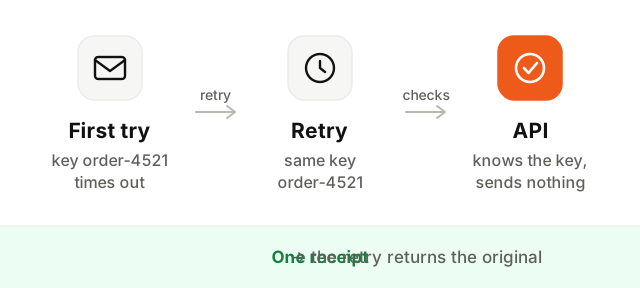
An idempotency key solves this. You send a value that names the event, such as order-4521 or reset-42-2026-10-07. If a second request arrives with the same key, the API returns the original result instead of sending again. In the example API, the reply says so with "replay": true.
Rate limits cap how many requests a key can make in a period. Past the limit, the API answers 429 Too Many Requests, usually with a Retry-After header saying how many seconds to wait. Respect it, and add exponential backoff with a little randomness for other temporary errors (5xx). Do not retry 4xx errors other than 429: a missing field or a revoked key will fail the same way every time.
If your code can produce a burst, send from a queue with controlled concurrency rather than a loop that fires all at once.
Domain authentication for an email API
Before an email API can send for yourapp.com, you have to prove you own it. The provider gives you DNS records to add:
- SPF, which lists the servers allowed to send for your domain. See what is SPF.
- DKIM, a public key that lets inboxes verify the signature on each email. See what is DKIM.
- DMARC, which ties both to the From address people see and sets a policy. See what is DMARC.
Since February 2024, Gmail and Yahoo require all three from bulk senders, and unauthenticated email from anyone is far more likely to land in spam. Check your domain here once the records are in place:
While you are in your DNS, plan two subdomains: one for transactional email (notify.yourapp.com) and one for marketing (news.yourapp.com). Each builds its own reputation, so a campaign that draws complaints never delays a password reset.
How to choose an email API provider
Most providers send email reliably. The differences show up in the details you only meet in production.
| Check | Why it matters |
|---|---|
| Domain authentication guided step by step | You will set up SPF, DKIM and DMARC, and later debug them |
| Idempotency keys | Safe retries without duplicate receipts |
| Events by webhook or status endpoint | You need to know about bounces and complaints |
| Automatic suppression of bounced and complained addresses | Protects your reputation when your code forgets |
Clear rate limits and Retry-After | Predictable behavior under load |
| Scoped API keys | A leaked key should not be able to do everything |
| Separate transactional and marketing streams | One cannot damage the other |
| Pricing at your expected volume | Some plans jump sharply past a threshold |
Before committing, send test emails to Gmail and Outlook and confirm SPF, DKIM and DMARC pass in the original headers.
Email API security: keeping keys safe
An API key is a password that can send email as your company. Treat it that way.
- Keep it server-side. Never call an email API from the browser or ship the key in a mobile app. Anyone can read it there.
- Store it in an environment variable or a secrets manager, never in your repository. If one was ever committed, revoke it, even if the commit was deleted.
- Use scoped keys. A key that can only send transactional email cannot be used to blast your whole list if it leaks.
- One key per environment. Revoke one without breaking the others.
- Rotate regularly. Create the new key, deploy it, then revoke the old one.
Where to go next
An email API is the plumbing; what travels through it still has to be wanted and sent to addresses that exist. Read transactional vs marketing email to decide what belongs on which stream, the email deliverability guide for what decides the inbox, and check any address before you send with the free email checker.