

On this page
DKIM is how an inbox knows that an email signed by your domain really came from you. Every email you send carries a digital signature, and anyone can check it against a key you publish in your DNS. No signature, or a signature that does not match, and Gmail, Outlook and Yahoo have one less reason to trust you.
This guide explains what DKIM is in plain words, how it works step by step, what the records and headers actually look like, and how to set it up without breaking anything.
What is DKIM?
DKIM (DomainKeys Identified Mail) is an email authentication standard. It adds a cryptographic signature to the header of every email you send. The receiving server uses a public key, published in your domain's DNS, to verify that signature.
When the check passes, two things are proven at once:
- The email was sent with your domain's permission. Only someone holding your private key could have produced that signature.
- The email was not changed on the way. The signature covers the body and the important headers. Change one character and it no longer matches.
Think of it as a wax seal. Anyone can see it, anyone can check it is yours, and nobody can open the letter and close it again without breaking it.
How DKIM works
DKIM relies on a pair of keys: a private key that stays with whoever sends your email, and a public key that you publish in DNS for the world to read. What one signs, only the other can verify.
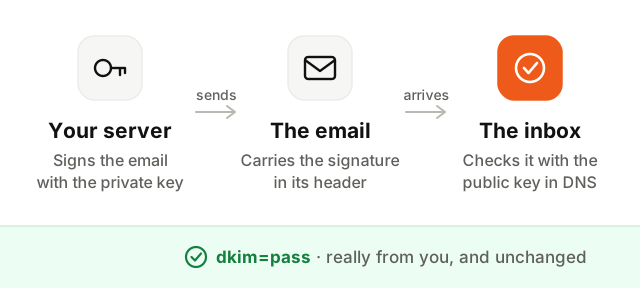
- 1Your sending service signs the email. Before the email leaves, your email provider or sending tool computes a fingerprint of its body and selected headers, and signs it with your private key.
- 2The signature travels with the email. It is added as a
DKIM-Signatureheader, which says who signed (d=, your domain) and which key to use (s=, the selector). - 3The receiving server fetches your public key. It combines the selector and the domain into a DNS name, like
s1._domainkey.acme.com, and reads the key published there. - 4It verifies the signature. If the key confirms the signature and the fingerprints match, the email passes DKIM. The result is written in an
Authentication-Resultsheader asdkim=pass.
All of this happens in milliseconds, for every email, without you or your reader doing anything.
What does a DKIM record look like?
The public key lives in a TXT record in your DNS. Its name is always built the same way: a selector, the fixed label _domainkey, then your domain.
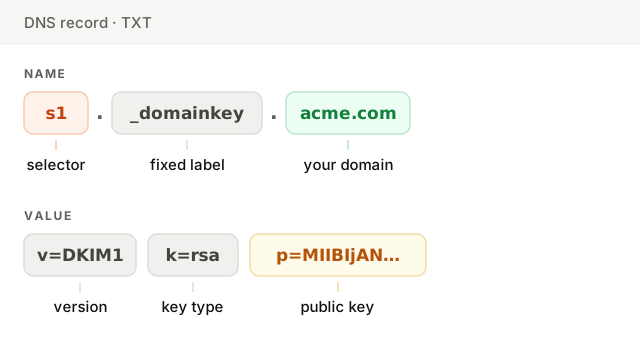
In practice, you rarely write this record yourself. Your sending service generates the key pair, keeps the private key, and gives you the record to copy into your DNS. Many services give you a CNAME instead, pointing to a key they host: that way they can rotate the key for you without asking you to touch your DNS again.
What is a DKIM selector?
A domain often sends email from several places: Google Workspace for your team, a newsletter tool, your app's transactional emails. Each one signs with its own key, and the selector is the name that tells them apart.
So google._domainkey.acme.com can hold the key your mailbox provider uses, while s1._domainkey.acme.com holds the key of your marketing tool. They live side by side and never conflict.
To find the selector of an email you sent, open it, show its original source (in Gmail: the three dots, then Show original), and look for s= in the DKIM-Signature line.
The DKIM-Signature header, explained
This is what the signature looks like inside an email. You never write it: your sending service adds it to every message.
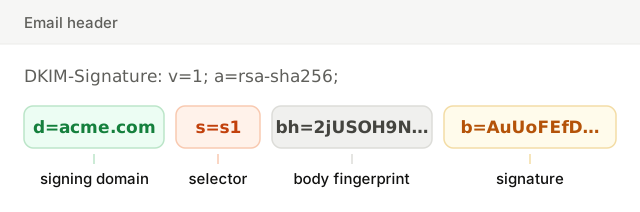
Two tags matter most when you debug. d= is the domain that signed: for DMARC to pass, it has to match the domain in your From address. s= is the selector: together with d=, it is where the receiver looks for your public key.
DKIM vs SPF vs DMARC
DKIM is one of three DNS records that together prove your emails are genuine. Each answers a different question (the SPF guide covers the second one in depth).
| What it answers | Where it lives | Survives forwarding | |
|---|---|---|---|
| SPF | Is this server allowed to send for this domain? | One TXT record on your domain | No |
| DKIM | Was this email signed by the domain, and is it unchanged? | One TXT or CNAME record per selector | Yes, usually |
| DMARC | What should happen when SPF and DKIM both fail? | One TXT record at _dmarc | Not applicable |
DKIM's big advantage is that the signature travels with the email. When someone forwards your email, it arrives from a different server and SPF fails, but the DKIM signature is still valid. That is why DMARC leans on DKIM more than on SPF in practice.
How to set up DKIM
Setting up DKIM takes about ten minutes per sending service. The exact screens differ from one provider to another, but the steps are always the same.
- 1Find the DKIM settings in your sending service. Look for "Authenticate your domain", "Domain verification" or "DKIM". Add your domain if it is not there yet.
- 2Copy the records it gives you. Usually one to three records: a name like
s1._domainkeyand a value, either a TXT record starting withv=DKIM1or a CNAME pointing to the provider. - 3Add them in your DNS. Wherever your domain's DNS is managed: your registrar, Cloudflare, your hosting provider. Paste the name and the value exactly as given.
- 4Verify in your sending service. Most check the record for you and show a green status within minutes. DNS changes can take up to a few hours to be visible everywhere.
- 5Send a test email and check it. Open it, show the original, and look for
dkim=passwith your own domain afterheader.d=.
Repeat for every service that sends email as your domain. A mailbox provider that signs your team's emails does nothing for the emails your newsletter tool sends.
How to check your DKIM record
The fastest way is to look up the record directly. Our free checker tries the selectors common services use, or the one you enter, then shows the key it finds, its size and what each part means.
You can also check a real email. In Gmail, open it and choose Show original: the summary at the top shows DKIM: 'PASS' with domain acme.com. In any client, the Authentication-Results header contains dkim=pass or dkim=fail, with the domain and selector that were used.
To check SPF, DKIM and DMARC together and see whether your domain meets the Gmail and Yahoo rules, run the Deliverability Setup Checker.
Common DKIM errors
Most DKIM failures come down to a handful of mistakes.
- The domain added twice. Many DNS hosts add your domain to the end of every name automatically. Type
s1._domainkey.acme.comand you gets1._domainkey.acme.com.acme.com. Enter onlys1._domainkeyin the name field. - A broken 2048-bit key. TXT records hold strings of 255 characters at most, and a 2048-bit key is longer. Most DNS hosts split it for you; some need you to paste it in two quoted parts. A key cut in the wrong place fails silently.
- A service sending without its own key. Your team's emails pass DKIM, but your app's emails are signed with the provider's domain, or not at all. Each service needs its own selector on your domain.
- The signature is for the wrong domain. An email can pass DKIM with
d=provider.com. That proves nothing about you, and DMARC fails. Make sured=is your domain. - A revoked or test key. An empty
p=means the key was revoked. At=yflag means testing mode, which some receivers treat leniently. Fix both before you rely on DKIM. - The email is changed after signing. A footer added by a mailing list or a security gateway alters the body, and the signature breaks. Sign as late as possible, after anything that edits the email.
DKIM best practices
- Use 2048-bit keys. 1024 bits is the minimum receivers accept, and it is the weakest. Anything shorter is ignored.
- One key per service. Never share a private key between tools. Revoking one should never stop the others.
- Rotate your keys. Replace them every six to twelve months, or immediately if a key may have leaked: publish the new key under a new selector, switch, then remove the old one. A CNAME setup lets your provider do this for you.
- Pair it with SPF and DMARC. DKIM proves an email is genuine; DMARC turns that into a policy and sends you reports on who uses your domain.
- Watch your DMARC reports. They are the only place you will see a service you forgot, signing nothing, before it hurts your deliverability.
DKIM is one of the few deliverability fixes that is free, quick and permanent. Set it up once for each service you send with, check it, and every email you send from then on carries proof that it is really yours.