

On this page
- 1What is transactional email?
- 2What is marketing email?
- 3Transactional vs marketing email: the comparison
- 4The gray zone: onboarding, usage alerts and promotions
- 5The primary purpose test under CAN-SPAM
- 6GDPR, ePrivacy and consent for marketing email
- 7Unsubscribe rules for transactional and marketing email
- 8Separate subdomains for transactional and marketing email
- 9How to set up transactional and marketing email
- 10Getting both right
Every SaaS product sends two kinds of email. Some are part of the product itself: the password reset, the receipt, the alert that a payment failed. Others exist to grow it: the newsletter, the launch announcement, the tips that bring a trial user back. They look alike in an inbox, but the law, the inbox providers and your own reputation treat them very differently.
This guide explains the difference between transactional and marketing email, where the line gets blurry, which rules apply to each, and how to set up your sending so a bad campaign can never stop a customer from logging in.
What is transactional email?
A transactional email is sent to one person because of something they did, or something that changed in their relationship with you. They expect it, and often cannot use your product without it.
Typical examples in a SaaS product:
- Account and security: email confirmation, password reset, magic link, two-factor code, new login alert.
- Billing: receipt, invoice, failed payment notice, card about to expire, subscription renewed or canceled.
- Product activity: an export is ready, a teammate invited you, a comment mentions you, a usage limit is close.
- Legal and policy: changes to the terms of service, a data request you made was completed.
Transactional email is triggered by your code, usually through an email API, and sent one at a time.
What is marketing email?
A marketing email exists to promote something: your product, a plan, a feature, an event, your content. It is usually sent to many people at once, or as part of an automated sequence, and the person did not trigger it by an action of their own.
Typical examples:
- Newsletters with articles, guides and company news.
- Product updates announcing new features to everyone.
- Promotions: a discount, an annual plan offer, an upgrade campaign.
- Nurture and onboarding sequences that teach the product and push toward activation or payment.
- Win-back campaigns for canceled customers.
Transactional vs marketing email: the comparison
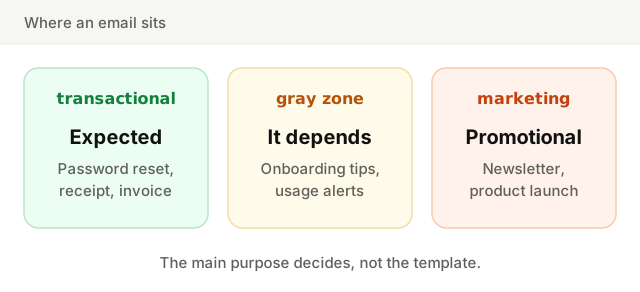
| Transactional email | Marketing email | |
|---|---|---|
| Purpose | Completes or reports on something the person did | Promotes your product, content or offers |
| Trigger | An action or account event | Your schedule or a campaign |
| Recipients | One person | A list or a segment |
| Timing | Immediate, seconds matter | Planned, minutes rarely matter |
| Consent | Generally not needed, it is part of the service | Required in many countries, opt-out at least in the US |
| Unsubscribe link | Not required | Required, with one-click unsubscribe for bulk senders |
| Can the person opt out? | Not from essentials like resets and receipts | Always |
| Sent through | An email API or SMTP from your code | A marketing platform or a marketing stream |
The gray zone: onboarding, usage alerts and promotions
Plenty of emails sit between the two, and those are the ones that cause trouble.
Onboarding sequences. The first "confirm your email" message is transactional. The five emails that follow over two weeks, with tips, case studies and a nudge to upgrade, promote the product. Treat them as marketing: give them an unsubscribe link and send them on your marketing stream. The guide to SaaS onboarding emails goes deeper on what to put in them.
Usage alerts. "You have used 90% of your monthly quota" is account information, so it is transactional. Add "Upgrade today and get 20% off" to the subject line and it starts reading like a promotion.
Trial ending notices. Telling someone their trial ends tomorrow and that their card will be charged is information about their account. A trial ending email that is mostly a pitch for features they have not tried is closer to marketing.
Receipts with a footer offer. A receipt that ends with a small line about your referral program is still a receipt. A receipt that opens with a banner for another product is a mixed message, and may be judged as marketing.
The primary purpose test under CAN-SPAM
In the US, the CAN-SPAM Act sorts email by its primary purpose. The FTC's rule describes "transactional or relationship" messages: those that complete or confirm a transaction the person agreed to, give warranty or safety information, report changes to an account or subscription, or deliver something the person is entitled to. These are exempt from most of the law's requirements, though they still must not use false or misleading header information.
A commercial message, one whose primary purpose is to advertise or promote, must follow all of them: no deceptive subject line, a valid postal address, a clear way to opt out, and opt-outs honored within 10 business days.
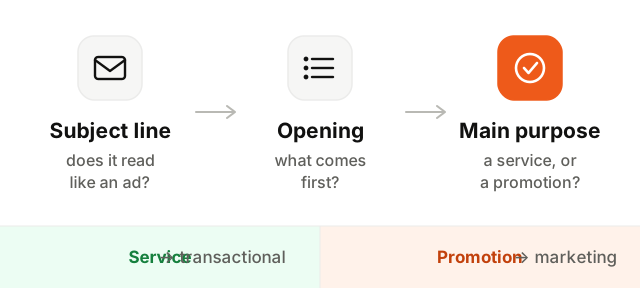
For a message that mixes both, the FTC looks mainly at two things. If the subject line would lead a reasonable person to think it is an ad, or if the transactional part does not appear mainly at the beginning of the body, the email is likely to be treated as commercial. Calling a promotion a "notification" does not change what it is.
GDPR, ePrivacy and consent for marketing email
In the EU and the UK, email marketing to individuals is governed by the GDPR together with ePrivacy rules (in the UK, PECR). In general terms:
- Marketing email usually needs prior consent, freely given and specific, that you can prove later.
- A soft opt-in exception exists in many countries: you may email existing customers about similar products or services of your own, if you gave them a chance to refuse when you collected their address and in every message since.
- Transactional email usually does not need consent. Emails needed to provide a service the person signed up for generally rely on the contract, or on legitimate interest for things like security alerts.
Canada's CASL is also consent based, with its own exemptions for transactional messages. Rules differ by country and change over time.
Unsubscribe rules for transactional and marketing email
Since February 2024, Gmail and Yahoo require bulk senders to support one-click unsubscribe on marketing and subscribed messages. In practice that means two headers, List-Unsubscribe and List-Unsubscribe-Post, which let the inbox show its own unsubscribe button, plus a visible link in the email, and unsubscribes honored within two days.
Transactional email is not covered by that rule, and should not carry a marketing unsubscribe at all. A customer who unsubscribes from your newsletter still needs their invoice, and an unsubscribe link on a password reset invites people to cut themselves off from their own account.
Two exceptions keep this honest:
- Optional notifications (weekly digests, comment alerts) should still be switchable in the product's settings, even if they are transactional by nature.
- Bounced and complained addresses should stop receiving everything. Sending a receipt to an address that hard bounced only hurts your sender reputation.
Separate subdomains for transactional and marketing email
Mailbox providers judge reputation by sending domain. If receipts and newsletters share one, a campaign that draws complaints drags down the reputation your password resets depend on.
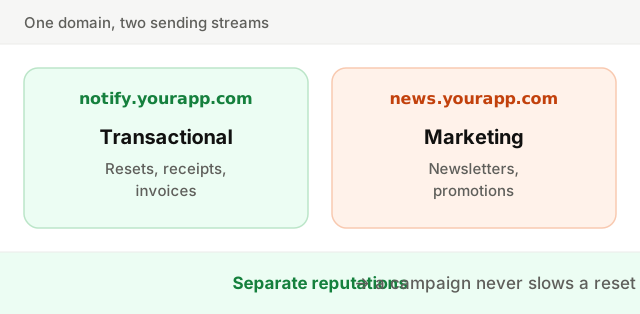
The common setup is two subdomains of your main domain, each authenticated on its own with SPF and DKIM, under a DMARC policy on the parent domain. People still see your brand in the From address, and each stream earns its own standing with Gmail and Outlook. If you can, also use separate sending infrastructure for each: separate API keys, separate queues, and IP addresses your marketing never touches.
How to set up transactional and marketing email
- 1List every email your product sends. Go through your code and your tools, and label each one transactional, marketing or gray.
- 2Decide the gray ones. Apply the test above. When unsure, treat the email as marketing: an unsubscribe link costs little, a complaint costs more.
- 3Keep transactional emails clean. Put the essential information first, in plain words, and keep any promotion small and at the end.
- 4Create two sending subdomains. For example
notify.yourapp.comandnews.yourapp.com, each with SPF and DKIM, and DMARC on your root domain. Check them with the SPF, DKIM and DMARC checker. - 5Collect consent for marketing. Record when and how each person agreed, and offer one-click unsubscribe on every marketing email.
- 6Share suppressions the right way. An unsubscribe removes someone from marketing only. A hard bounce or spam complaint stops everything to that address.
Getting both right
Transactional email has to arrive every time, so it stays plain, immediate and protected from everything else. Marketing email has to earn its place, so it asks for consent, makes leaving easy and lives on its own stream.
To go further, see how an email API sends the transactional side, the email marketing best practices for the other half, and run your campaigns through the spam words checker before they go out.