

On this page
- 1Build your email list with permission
- 2Segment your email list by behavior, and pick a rhythm
- 3Write subject lines and preheaders that earn the open
- 4Email design best practices
- 5Write clear copy with one call to action, and personalize it
- 6Email marketing automation: welcome, onboarding, re-engagement
- 7Test one variable at a time
- 8Email deliverability and compliance basics
- 9Measure what matters: clicks and conversions
- 10Email marketing do's and don'ts
Most marketing emails fail for boring reasons. They go to people who never asked for them, they say the same thing to everyone, and they try to do five things at once. None of that needs a bigger budget to fix. It needs a few habits, applied every time you hit send.
This guide walks through those habits in the order you meet them: building a list people actually signed up for, deciding who gets what, writing and designing the email, automating the ones that repeat, testing, staying out of spam, and measuring what matters.
Build your email list with permission
Every email marketing best practice starts here. Only email people who asked to hear from you. That means a clear sign-up form, a checkbox that is not pre-ticked, and a sentence that says what they will get and how often.
Never buy, rent or scrape a list. People who never opted in do not open, do not click, and report you as spam. Inbox providers notice, and your sender reputation drops for everyone on your list, including the people who did want your emails.
A few habits keep a list healthy as it grows:
- Use double opt-in when you can. A confirmation email keeps typos and fake addresses off your list.
- Set expectations at sign-up. "One email every Tuesday with what we shipped" beats "Subscribe to our newsletter".
- Clean the list regularly. Remove hard bounces right away and stop emailing people who have not engaged in months. The guide to email list hygiene covers how. You can also check a doubtful address with the email checker.
Segment your email list by behavior, and pick a rhythm
Sending the same email to everyone is the fastest way to make most of it irrelevant. Segmentation means splitting your list into groups that should hear different things.
Demographics (country, job title, company size) are a start. Behavior is better. What someone did, or stopped doing, tells you far more about what they want to read next.
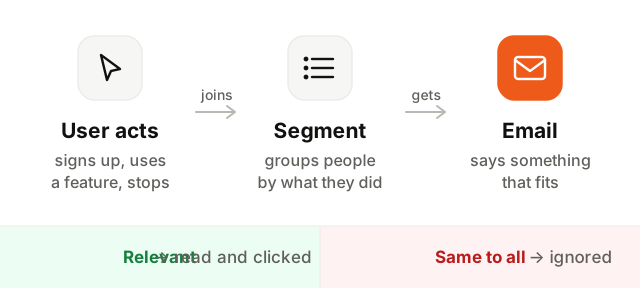
Useful segments to start with:
- New subscribers in their first two weeks
- Active customers versus people on a free plan or trial
- People who used a specific feature, or never did
- People who have not opened or clicked in a long time
Three or four segments that change what you say are worth more than twenty that nobody maintains.
As for timing, there is no magic send time. The right rhythm is one you can keep and that matches what you promised at sign-up. Send in your readers' time zone, and after any change in frequency, watch unsubscribes and spam complaints. If they climb, you are sending more than people want.
Write subject lines and preheaders that earn the open
In the inbox, people see three things before they decide: who sent it, the subject, and the preheader.
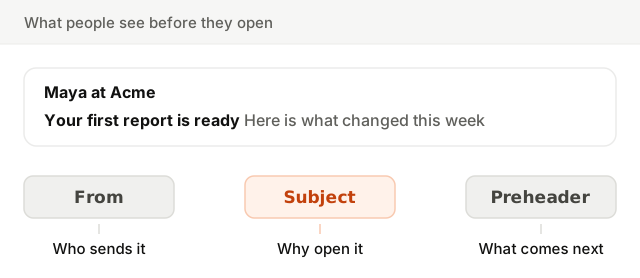
- The from name should be a person or your product name, the same every time, so people recognize it.
- The subject line should say what is inside, specifically. "Your May report is ready" beats "Big news!". Keep it short enough to read on a phone, roughly under 50 characters.
- The preheader completes the subject. If you leave it empty, the inbox fills it with the first text it finds, often "View this email in your browser".
Avoid all caps, strings of exclamation marks and pushy phrases like "act now" or "100% free". They read as spam to people and to filters alike. Paste your subject and body below to see which words might trigger a filter.
Email design best practices
Good email design is mostly restraint. Most people read on a phone, in a narrow column, often in dark mode.
- 1Use a single column. It reads well on every screen and never breaks into odd layouts. Aim for a width around 600 pixels on desktop.
- 2Design for mobile first. Body text large enough to read without zooming, buttons big enough to tap with a thumb, and plenty of space between links.
- 3Put real text in the email, not text in images. Many inboxes block images by default. An email that is one big picture shows up blank, and filters distrust it.
- 4Write alt text for every image. It shows when images are blocked and it is what screen readers read aloud.
- 5Check contrast and dark mode. Dark text on a light background with strong contrast, and a test in dark mode, where some apps invert your colors. Transparent logos on dark backgrounds are a classic surprise.
Write clear copy with one call to action, and personalize it
Each email should have one job. Decide what you want the reader to do (read the post, try the feature, book the call) and build the email around that one action.
- Lead with the point. The first two lines are often the only ones read.
- Write like a person talking to one reader, not a brochure talking to a crowd.
- Use one main button, with a label that says what happens: "See your report", not "Click here".
- Keep it short. If a second idea feels important, save it for the next email.
Here is the shape of a focused email:
Subject: Your May report is ready
Preheader: Signups are up, one page is slowing down

Hi Sam,

Your report for May is in. Two things stand out:
signups grew, and your pricing page loads slower than last month.

[See your report]

Maya
Personalize beyond the first name. "Hi {first name}" fools nobody. Real personalization changes what the email says: the plan they are on, the project they created last week, the feature they have not tried yet. And set a fallback, so a missing name shows "Hi there" instead of "Hi ,".
Email marketing automation: welcome, onboarding, re-engagement
The emails that repeat should send themselves. Automation lets you send the right email at the moment it is most useful, without writing it again each time.
| Automation | Trigger | What it does |
|---|---|---|
| Welcome | Someone subscribes or signs up | Says hello, sets expectations, gives one first step |
| Onboarding | A new user has not done a key step yet | Helps them reach the first moment of value |
| Re-engagement | No opens or clicks for a long time | Asks if they still want your emails, then removes them if not |
| Milestone | A user hits a goal or anniversary | Celebrates progress and suggests what is next |
For software products, onboarding is where automation pays off the most. The guide to SaaS onboarding emails covers how to trigger them on what users do, not on fixed days.
Test one variable at a time
An A/B test sends two versions of an email to small parts of your list, then sends the winner to everyone else. It only teaches you something if the versions differ by one thing.
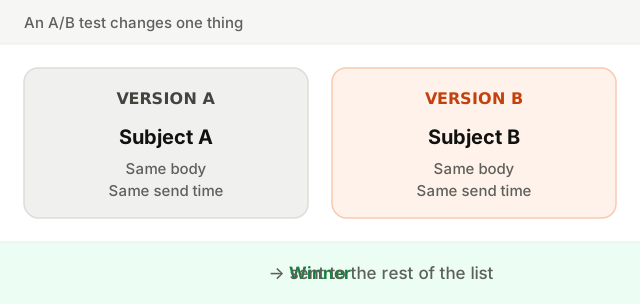
Test the subject line, the call to action or the send time, but never several at once. Pick the metric that matches the goal, and make sure each group is large enough that the difference is not just noise.
Email deliverability and compliance basics
The best email does nothing in the spam folder. Three foundations come first:
- Authenticate your domain with SPF, DKIM and DMARC. Gmail and Yahoo expect all three from bulk senders. Check yours with the deliverability setup checker.
- Offer one-click unsubscribe. A visible link in the footer and the one-click unsubscribe header, so the inbox can show its own button. Someone who cannot leave easily will mark you as spam instead.
- Keep bounces and complaints low. A clean list and relevant emails do most of the work. The guide on how to avoid the spam folder goes deeper.
Laws differ by country, but the safe rules are the same almost everywhere: get clear consent, identify yourself honestly, include a postal address where required, and honor unsubscribes promptly. In the EU and UK, you must also be able to show when and how someone opted in. When in doubt, ask a lawyer.
Measure what matters: clicks and conversions
Open rates used to be the headline number. Today they are unreliable: some email apps load images automatically, which counts as an open whether or not anyone read the email, and others block tracking. Use the open rate as a rough trend, not a verdict.
Focus on what people do:
- Click-through rate: did the email get people to act? See email click-through rate.
- Conversions: did they sign up, upgrade, or use the feature the email was about?
- Unsubscribes and complaints: too much, or to the wrong people?
- Bounce rate: is the list itself healthy? See email bounce rate.
Email marketing do's and don'ts
| Do | Don't |
|---|---|
| Email people who opted in | Buy, rent or scrape lists |
| Segment by what people did | Send the same email to everyone |
| Write a specific subject and a preheader | Use all caps and "act now" |
| Use one column, real text and alt text | Send one big image |
| Give each email one clear call to action | Stack five links of equal weight |
| Personalize with real context | Stop at "Hi {first name}" |
| Test one variable at a time | Change everything and guess |
| Authenticate with SPF, DKIM and DMARC | Skip setup and hope for the inbox |
| Measure clicks and conversions | Judge emails on opens alone |
These practices compound. A permission-based list makes segmentation meaningful, segmentation makes copy relevant, and relevant emails keep you out of spam. Start with the foundations: check your domain with the deliverability setup checker, then read about sender reputation and the difference between transactional and marketing email.