

On this page
- 1What is a SaaS onboarding email?
- 2Find your activation event (the aha moment)
- 3Behavior-triggered vs time-based onboarding emails
- 4Product events and billing events to trigger on
- 5SaaS onboarding email sequence examples
- 6How to write onboarding emails people read
- 7Onboarding email metrics that matter
- 8Common SaaS onboarding email mistakes
- 9Keep onboarding and billing emails working together
Most SaaS onboarding emails are written as a calendar. Day 0, welcome. Day 1, here is feature A. Day 3, have you tried feature B? Everyone gets the same emails on the same days, whether they set up their account in ten minutes or never logged in again.
A better approach is to send each email because of something the user did, or did not do. This guide covers how to find the moment your onboarding should lead to, a sample sequence built on product and billing events, how to write the emails, and how to tell whether they work.
What is a SaaS onboarding email?
A SaaS onboarding email is an email sent to a new user to help them get started with your product. Its job is not to tell them everything your product can do. Its job is to get them to their first real result as quickly as possible, because users who get there are the ones who stay and pay.
Onboarding emails work alongside what happens inside the product (checklists, empty states, tooltips). The product helps people while they are logged in. Email brings them back when they are not.
Find your activation event (the aha moment)
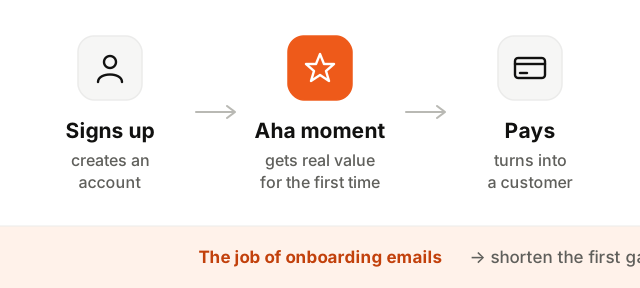
Before writing anything, decide what "onboarded" means for your product. That is your activation event: the action that shows a new user got real value for the first time.
Some examples:
- A project management tool: creating a first project and inviting a teammate
- An invoicing app: sending a first invoice
- An analytics product: seeing the first data come in
- An email tool: sending a first campaign
Pick one. Look at users who converted to paid and the ones who left: what did the first group do early on that the second did not? That action, or something close to it, is your activation event. Every onboarding email should move people one step closer to it.
Behavior-triggered vs time-based onboarding emails
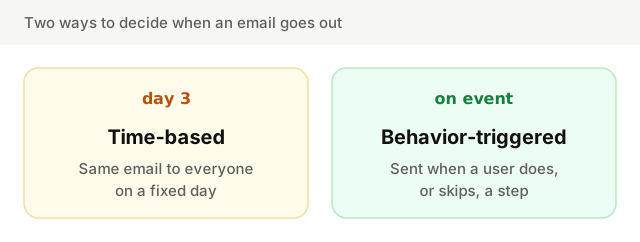
| Time-based | Behavior-triggered | |
|---|---|---|
| Sent when | A fixed number of days after sign-up | A user does something, or has not done it after a delay |
| Same for everyone | Yes | No, each user gets the emails that fit their progress |
| Risk | Telling people to do what they already did | Needs reliable product events |
| Stops when | The sequence runs out | The user reaches the goal |
| Feels like | A newsletter | Someone paying attention |
Time still matters in a behavior-triggered sequence. "No project after two days" uses a delay. The difference is that the delay is a condition checked against what the user actually did, not a date on a calendar.
Product events and billing events to trigger on
Behavior-triggered onboarding needs two kinds of signals.
Product events come from your app and your database: what users do inside the product.
signed_up: the account was createdproject_created: the first project, workspace or document existsintegration_connected: they linked the tool your product depends onteammate_invited: someone else joined the account
Billing events come from your payment provider: where the user stands commercially.
- Trial started: the clock is ticking
- Trial ending: a few days before the end of the trial
- Subscription created: they paid, so the conversion emails stop
- Subscription canceled: they left, which is worth a short "what went wrong?" email
The names above are examples. What matters is that both sources feed the same system, so a user who already subscribed never gets the "your trial is ending" email.
SaaS onboarding email sequence examples
Here is a sample sequence for a product with a 14-day trial, where the activation event is creating a first project.
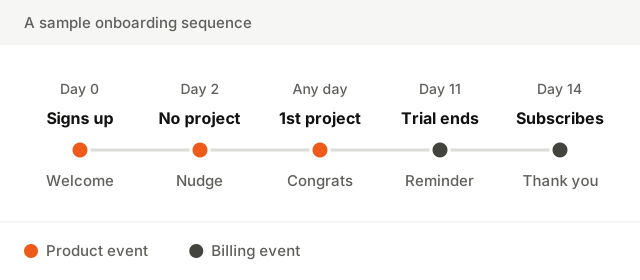
- 1Welcome, right after sign-up. Thank them, then point to the single first step. Not a tour of every feature.
- 2Nudge, if the key step is not done after two days. Only to people who have not created a project. Name the thing that might be in the way and offer help.
- 3Celebrate the first success. The moment the project exists, whatever the day. Confirm it worked and suggest the next step.
- 4Trial ending reminder. A few days before the trial ends, for users who have not subscribed. Say when it ends and what happens next.
- 5Convert, or thank. If they subscribe, a thank you and the stop of every trial email. If not, one last email with what they would keep by upgrading.
What these emails can look like:
Subject: Your account is ready
From: Maya at Acme

Hi Sam,

Thanks for signing up. The fastest way to see what Acme does
is to create your first project. It takes about two minutes.

[Create your first project]

If anything is unclear, just reply. I read every answer.
MayaSubject: Stuck on your first project?
Hi Sam,
I noticed you have not created a project yet. Most people get
stuck at the import step, so here is a two-minute guide.
[Create your first project]
Or reply and tell me what you are trying to do. I will help.
MayaSubject: Your first project is live
Nice work, Sam. Your project is set up and tracking.
Next step: invite a teammate, so you are not the only one
seeing the results.
[Invite a teammate]How to write onboarding emails people read
- Write plainly. Short sentences, no jargon, no marketing adjectives. A plain-text look often feels more personal than a heavy template.
- One action per email. One link or button, pointing to the next step in the product. Two calls to action means neither gets done.
- Send from a real person. A name, a face if you like, and a reply address that reaches a human. Replies are free user research.
- Be specific to what they did. "Your first project is live" beats "Getting started with Acme".
- Link deep into the product. Send people straight to the screen where the action happens, not to the dashboard home.
For the basics that apply to every email (subject lines, design, deliverability), see the email marketing best practices guide.
Onboarding email metrics that matter
Opens and clicks tell you whether an email is read. They do not tell you whether onboarding works. Track these instead:
- Activation rate: the share of new sign-ups who reach the activation event, and how long it takes them.
- Trial-to-paid conversion: the share of trials that become paying customers.
- Time to activation: how many days between sign-up and the aha moment. Good onboarding shortens it.
- Per-email click rate: useful to improve each email, as long as you remember the goal is the action, not the click. The guide to email click-through rate has more.
Common SaaS onboarding email mistakes
- Emailing people who already did the thing. The classic. Telling someone to create their first project when they created three yesterday makes your product look like it is not paying attention. Exit people from a nudge the moment the event happens.
- Too many emails. A daily email for two weeks drowns the useful ones. Send fewer, better-timed emails.
- Feature tours. Listing ten features in the welcome email gives the reader ten decisions to make. Give them one.
- Ignoring billing state. A "your trial is ending" email to someone who paid last week erodes trust. Product and billing events need to reach the same place.
- A no-reply sender. It tells new users you do not want to hear from them, at the moment their feedback is most valuable.
- Never revisiting the sequence. Your product changes. An onboarding email that points to a screen you redesigned six months ago does more harm than good.
Keep onboarding and billing emails working together
Onboarding hands off to billing at the end of the trial, and billing has its own emails to get right, starting with the ones you send when a renewal charge fails. The guide to failed payment emails covers that sequence. And because onboarding and billing emails often sit on different streams, it is worth knowing the difference between transactional and marketing email. Before you send anything, check that your domain is set up correctly with the deliverability setup checker.