

On this page
- 1What is involuntary churn?
- 2What is a dunning email?
- 3How a dunning sequence works
- 4Example dunning email timeline
- 5What to write in a failed payment email
- 6Pre-dunning: card expiry reminders
- 7Smart retries in your billing provider
- 8Failed payment emails are transactional
- 9Dunning metrics: measure your recovery rate
- 10Recover more, then prevent more
Some customers leave because they decided to. Others leave without deciding anything: their card expired, the bank declined a renewal, and nobody told them, or they missed the one email that did. That second kind of loss is called involuntary churn, and for a subscription business it is the easiest churn to win back.
The tool for winning it back is a dunning sequence: automatic retries of the payment, paired with a few clear emails asking the customer to update their card. This guide covers how that sequence works, an example timeline, what each email should say, and how to prevent failures before they happen.
What is involuntary churn?
Involuntary churn is when a customer stops paying without choosing to cancel. The subscription ends because a payment failed and was never fixed, not because the customer was unhappy.
The usual causes are mundane:
- Expired cards. The card on file reached its expiry date and the customer never updated it.
- Replaced cards. A lost or stolen card was canceled and a new one issued, with a new number.
- Insufficient funds. The account was low on the day of the charge.
- Bank declines. The issuing bank refused the charge, often for a fraud check or a limit, and usually without a detailed reason.
Almost none of these customers meant to leave. Most will fix the problem in a minute, as long as they hear about it clearly and in time.
What is a dunning email?
A dunning email (or failed payment email) tells a customer that a payment did not go through and asks them to update their payment method. "Dunning" is an old word for demanding payment of a debt, but a good dunning email reads nothing like a debt collector. It reads like a helpful heads-up.
Dunning emails come as a sequence, timed alongside the billing system's retries.
How a dunning sequence works
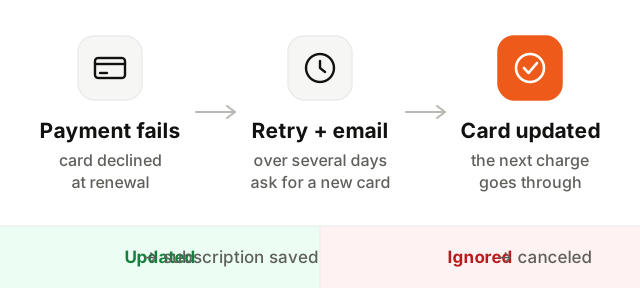
- 1The payment fails. A renewal charge is declined. Your billing provider marks the invoice as unpaid and notifies your system; with Stripe, through the
invoice.payment_failedwebhook event. - 2The first email goes out. Right away, saying the payment failed and linking to the page where the customer can update their card.
- 3The provider retries. Over the following days, the charge is attempted again. Some failures, like insufficient funds, fix themselves.
- 4Reminders follow failed retries. Each failed attempt can trigger a shorter follow-up email.
- 5A final notice. Before the last retry, an email says clearly what happens next and when.
- 6Access is paused or canceled. If nothing works, the subscription is canceled, or access paused, depending on your policy. A successful payment at any step stops the sequence.
Example dunning email timeline
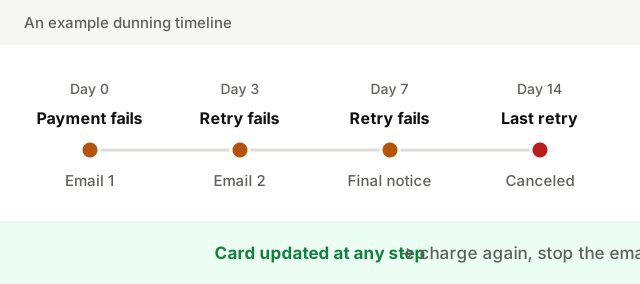
| Day | What happens | |
|---|---|---|
| 0 | First charge fails | "Your payment didn't go through" with a link to update the card |
| 3 | Retry fails | Short reminder |
| 7 | Retry fails | Final notice, with the date access ends |
| 14 | Last retry fails | Subscription canceled, with a way to come back |
Monthly plans often run the whole sequence over one to three weeks. Annual plans involve more money, so a longer window and a more personal touch, even a message from a person, can be worth it.
What to write in a failed payment email
Every email in the sequence follows the same rules:
- A clear subject. "Your payment for Acme didn't go through" works. "Action required!!!" looks like phishing.
- Why it failed, in plain words. "Your card ending in 4242 was declined" or "your card has expired". Skip bank codes.
- One button. It goes straight to the page where they can update their card, ideally without having to log in first.
- What happens next. When you will try again, and when access ends if nothing changes.
- No blame. Assume it is an accident, because it almost always is.
- A way to reach a person. Some customers want to switch plans or pay another way.
A first email might read:
Subject: Your payment for Acme didn't go through

Hi Sam,

We tried to charge your card ending in 4242 for your Acme Pro
plan ($29), but the bank declined it. This happens, often
because a card expired or was replaced.

[Update your card]

We'll try again in 3 days. Your account stays fully active
in the meantime.

Questions? Just reply to this email.
And the final notice:
Subject: Last reminder: your Acme account pauses on May 14

Hi Sam,

We still couldn't charge your card for Acme Pro. If it isn't
updated by May 14, your account will be paused. Your projects
and data stay safe, and you can pick up where you left off.

[Update your card]Pre-dunning: card expiry reminders
The best failed payment is the one that never happens. Pre-dunning emails go out before a renewal is at risk, most often when the card on file is about to expire.
A simple version: a month before the expiry date, and again a week before the next renewal, email the customer asking them to update the card. Same rules as above: one clear subject ("Your card on file expires soon"), one button, no alarm. Some billing providers can update card details automatically with the card networks for some cards, which reduces how often you need to ask, but does not remove the need.
Smart retries in your billing provider
Most billing providers retry failed payments for you, and many let you choose how. Stripe, for example, offers automatic retries that pick timing based on its own data, as well as a custom schedule, and can send its own emails to customers. Use the retries: some failures succeed on a later attempt without the customer doing anything.
Then decide who sends the emails. The provider's built-in emails are a reasonable default. Sending your own lets you match your product's voice, send from a real person, add context about what the customer would lose, and link directly to your billing page. Whichever you choose, send one set of emails, not both, or customers get two warnings for the same problem.
Failed payment emails are transactional
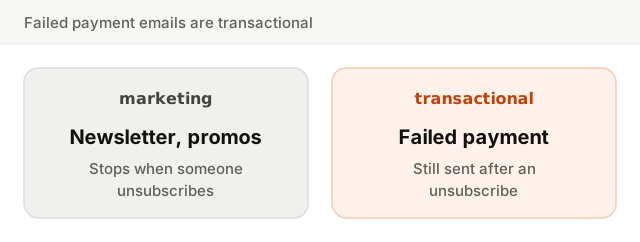
A failed payment email is about an account the customer is paying for. That makes it transactional, like a receipt or a password reset, not marketing. Two consequences:
- Send it even to people who unsubscribed from marketing. Opting out of your newsletter does not mean opting out of hearing that their account is about to stop.
- Keep it on your transactional stream. Send it alongside receipts, with no promotions in it. A discount offer turns it into marketing, and mixes your most important emails with your least wanted ones.
More on why the two streams stay apart in transactional vs marketing email.
Dunning metrics: measure your recovery rate
- Recovery rate: of the subscriptions that had a failed payment, the share that ended up paid. This is the number your dunning sequence exists to raise.
- Time to recovery: how many days between the first failure and the successful payment. Shorter means less time at risk.
- Recovery by step: which email, or which retry, recovered the payment. It tells you whether the final notice is doing the heavy lifting or the first email already is.
- Involuntary churn: subscriptions lost to failed payments, tracked separately from customers who chose to cancel.
Clicks on the "Update your card" button are useful too, but the payment itself is the result that matters.
Recover more, then prevent more
A good dunning setup is a short list: retries in your billing provider, three or four plain emails with one button each, card expiry reminders, and all of it on the transactional stream. Make sure those emails reach the inbox with a sound email deliverability setup, which you can check with the deliverability setup checker. And for the other end of the customer lifecycle, see how to build SaaS onboarding emails that follow what users do.