

On this page
You can write the best email of your life and still lose it to the spam folder. Nobody tells you. The send report says "delivered", your dashboard shows a healthy number, and meanwhile half your readers never see the message. That gap between sending an email and someone reading it is what email deliverability is about.
This guide explains what deliverability actually measures, how inbox providers decide where your email goes, the rules Gmail and Yahoo now enforce, how to measure where you stand, and a checklist to work through.
What is email deliverability?
Email deliverability is your ability to get email into the inbox of the people you send to, not just onto their mail server. It covers everything that happens after you press send: whether the receiving server accepts the message, whether filters trust it, and which folder it lands in.
Good deliverability is not one setting you switch on. It is the result of several things working together: proving the email is really yours, sending in a way that builds trust over time, and sending to people who want your mail.
Delivery rate vs deliverability
These two terms get mixed up constantly, and the difference matters.
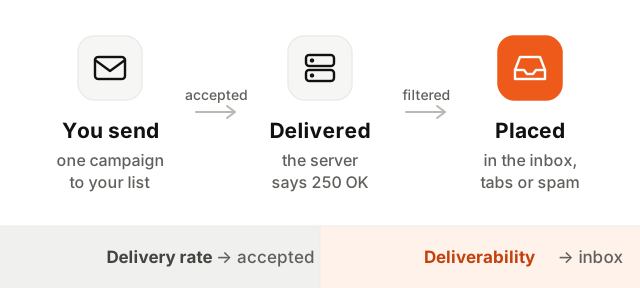
The delivery rate is the share of emails the receiving server accepted, the ones that did not bounce. It is easy to measure and usually high. Inbox placement is the share that reached the main inbox rather than spam. Your sending tool rarely knows that number, because the receiving server does not report where it filed your message.
So a 99% delivery rate can coexist with terrible deliverability. If opens and clicks fall off a cliff while delivery stays flat, the mail is arriving, just not where people look.
How inbox providers decide where your email goes
Gmail, Outlook, Yahoo and the rest each run their own filters, and none publish the exact recipe. But the signals they weigh fall into three broad groups.
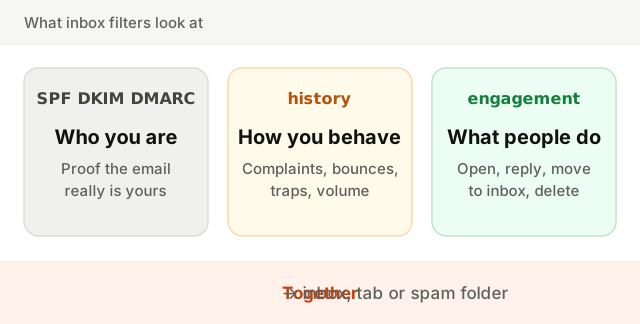
- Identity. Is this email really from the domain it claims? Authentication answers that, and an unauthenticated email starts with a heavy handicap.
- Reputation. What has this domain (and the server sending it) done in the past? Complaints, bounces, spam trap hits and erratic volume all lower it. More in our guide to sender reputation.
- Engagement. How do people react? Opening, replying, moving a message out of spam and adding you to contacts are good signs. Deleting unread and clicking "Report spam" are bad ones.
Content still plays a part, but less than most people think. A clean message from a sender with a poor reputation goes to spam; a plain message from a trusted sender lands fine.
The pillars of email deliverability
Here is everything that feeds those signals, and what to do about each.
| Pillar | What it covers | What to do |
|---|---|---|
| Authentication | SPF, DKIM and DMARC on your sending domain | Set up all three, aligned with your From domain |
| Sender reputation | Your domain's and IP's track record | Send consistently, avoid spikes, keep complaints low |
| List quality | Whether addresses are real and opted in | Use opt-in, never buy lists, remove bounces at once |
| Engagement | How recipients react over time | Send what people signed up for, stop mailing the inactive |
| Content | Subject, HTML, links, images | Honest subject lines, working HTML, your own link domains |
| Infrastructure | IPs, sending domain, tracking domain | Pick shared or dedicated IPs to fit your volume, brand your links |
Two infrastructure choices deserve a word. A dedicated IP gives you a reputation of your own, which only helps if you send enough mail, steadily, to build one. Below that, a shared IP pool run by a careful provider is usually the better place to be. And a custom tracking domain (say links.yourcompany.com) makes the links in your emails point to your own domain instead of a provider's domain shared with thousands of other senders, some of them careless.
Gmail and Yahoo bulk sender requirements
In February 2024, Gmail and Yahoo started enforcing rules for bulk senders, which Google defines as anyone sending close to 5,000 or more messages to personal Gmail accounts in a day. In 2025 Microsoft announced similar requirements for high-volume senders to Outlook.com, Hotmail and Live addresses. The rules:
- Authenticate with SPF and DKIM, and publish a DMARC record (a policy of
p=noneis the minimum). The From domain must align with the SPF or DKIM domain. - Offer one-click unsubscribe on marketing mail, using the
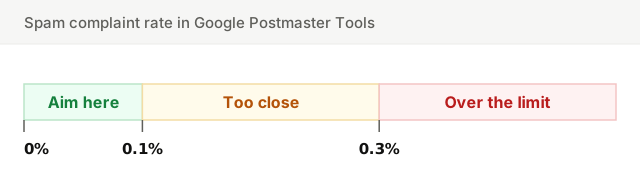
List-UnsubscribeandList-Unsubscribe-Postheaders defined in RFC 8058, plus a visible unsubscribe link in the body. Honor requests within two days. - Keep the spam complaint rate low, as reported in Google Postmaster Tools.
- Use valid forward and reverse DNS for sending IPs and send over a TLS connection.
Even if you send less than the bulk threshold, follow these rules anyway. They describe what any trustworthy sender looks like, and smaller senders get filtered on the same signals.
Check your email authentication
Authentication is the one pillar you can verify in a minute. Enter your domain below to check your SPF, DKIM and DMARC records together.
If something is missing, our guides to SPF, DKIM and DMARC walk through each record.
How to measure email deliverability
No single number tells you your inbox placement. You combine a few imperfect sources.
Google Postmaster Tools. Free, and the most valuable source for Gmail. Verify your domain and it shows your spam rate, whether you meet the bulk sender requirements, authentication results and delivery errors. It needs a meaningful daily volume to Gmail before it shows data.
Microsoft SNDS. Smart Network Data Services shows how Outlook.com sees the IP addresses you send from: filtering status, complaint rates, spam trap hits. It is only useful when you control your sending IPs.
Seed tests. You send to a set of test mailboxes across providers and see where the message lands. Useful to catch a broken setup, but take the results with caution: seed accounts never open or reply, so they do not get the engagement-based treatment your real subscribers do.
Your own metrics, per provider. Split opens, clicks and complaints by mailbox provider. If Gmail opens drop by half while Outlook stays stable, the problem is with Gmail, not your content. Open rates are noisy because of privacy features (see our guide to open rates), but a sudden drop still means something.
DMARC reports. The aggregate reports tell you who is sending as your domain and whether it passes, which catches forgotten services and spoofing.
Email deliverability checklist
- 1Authenticate everything. SPF, DKIM and DMARC on every domain and subdomain that sends, with the From domain aligned.
- 2Send only to people who opted in. No bought, rented or scraped lists. Consider double opt-in for signup forms.
- 3Make leaving easy. One-click unsubscribe headers and a visible link in every marketing email.
- 4Suppress bounces and complaints automatically. A hard bounce or a spam report means you never email that address again.
- 5Stop mailing the inactive. People who have not opened or clicked in months hurt you more than they help. Try a re-engagement email, then let them go. See email list hygiene.
- 6Keep volume steady. Grow gradually, avoid sudden spikes, and warm up any new domain or IP.
- 7Separate your streams. Send marketing and transactional mail from different subdomains so one cannot sink the other.
- 8Watch your numbers weekly. Spam rate in Postmaster Tools, bounce rate, and engagement per provider.
Keep going
Deliverability is the sum of many small habits rather than a trick. For the concrete fixes when mail is already landing in spam, read how to avoid the spam folder. To understand the score behind it all, read the guide to sender reputation, and keep your list clean with the bounce rate guide. Before a send, run your copy through the spam words checker and your setup through the deliverability setup checker.