

On this page
Open rate is the first number most people look at after a send. It is simple, it comes back within the hour, and it feels like a direct answer to the question "did anyone read this?". It is also the least reliable metric in email, and has been since 2021.
This guide explains how opens are actually measured, how to calculate open rate, what broke it, what a reasonable number looks like, and what to watch instead when you need to know whether an email worked.
What is email open rate?
Email open rate is the share of delivered emails that were opened. If you deliver a newsletter to 1,000 people and 350 of them open it, your open rate is 35%.
It sounds like a measure of attention, but strictly speaking it measures something narrower: how many times a small image inside your email was downloaded. Most of the time that happens because a person opened the email. Increasingly often, it happens for other reasons.
How open tracking works
Email has no built-in read receipt that senders can rely on. To count opens, email tools add a tracking pixel: a transparent image, one pixel wide, with an address unique to each recipient.
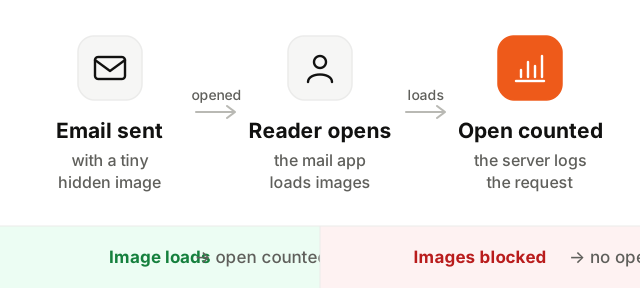
- 1The email is sent with a hidden image. Its address carries an identifier for this recipient and this campaign.
- 2The reader opens the email. Their mail app displays the message and downloads its images, the pixel included.
- 3The server logs the request. The sending tool sees the pixel requested and records an open for that recipient, with a time.
Two consequences follow. An open is only recorded if images load, and an open is recorded whenever images load, whoever or whatever loaded them.
How to calculate open rate
The formula:
Open rate = unique opens / delivered emails × 100
Two details matter:
- Use unique opens. One person opening the same email five times is one open. Total opens are useful for spotting an email that gets forwarded or reread, not for the rate.
- Divide by delivered, not sent. Bounced emails never reached an inbox. If 2,000 emails were sent, 50 bounced and 600 people opened, the open rate is 600 / 1,950 = 30.8%, not 30%. A high bounce rate is a separate problem and deserves its own number.
Apple Mail Privacy Protection and inflated opens
In September 2021, Apple launched Mail Privacy Protection (MPP) with iOS 15 and macOS Monterey. When a user turns it on in the Apple Mail app, Apple downloads the images of every incoming email in advance, through its own servers, whether or not the person ever opens it.
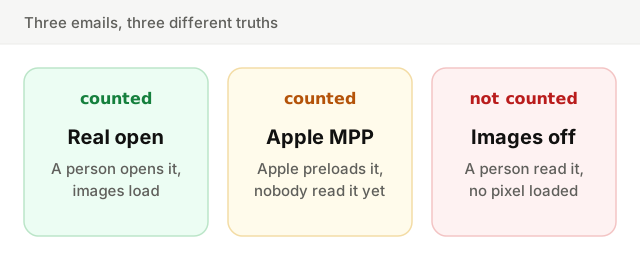
For senders, that means the tracking pixel loads for every MPP user. Each of those emails is counted as opened, often within minutes of delivery, even if it sits unread for a week or is deleted unseen. Apple Mail is used by a large share of readers, so on many lists open rates jumped overnight without a single extra person reading anything.
MPP broke more than the headline number:
- Subject line tests became noisy, since a share of every variant "opens" automatically.
- Open-based automations (resend to non-openers, tag as engaged) fire on people who never looked.
- Open time is no longer the time someone read the email, so send-time analysis based on opens is skewed.
- Location and device data taken from opens now points to Apple's servers.
Image blocking hides real opens
The opposite error exists too. Some mail apps and many corporate setups do not load images by default. A reader can open your email, read every word of a plain-looking message, and never be counted. Plain text emails, which contain no image at all, cannot be tracked for opens.
So open rate is wrong in both directions: inflated by machines that load images without reading, and deflated by people who read without loading images. On some lists the two errors partly cancel out. On others they do not.
What is a good email open rate?
The honest answer: the one you had last month, on the same list, or a little higher. Published benchmarks mix industries, list sizes, opt-in methods and audiences, and most of them now include MPP opens.
With that caveat, a rough picture:
| Type of email | Rough open rate range | What pulls it up or down |
|---|---|---|
| Marketing newsletters and promotions | 20% to 40% | Industry, list age, how often you send |
| Product updates to your own users | 30% to 50% | How active the users are in the product |
| Onboarding and lifecycle emails | 40% to 60% and above | Sent right after sign-up, when interest is highest |
| Cold or purchased lists | Often well under 20% | No relationship, poor list quality |
These ranges vary by industry and list, and with a large share of Apple Mail readers they can sit much higher. Treat them as a sanity check, not a target. What deserves attention is a change: a drop from 40% to 22% on the same list, with the same kind of content, almost always means emails have started landing in spam. That is a deliverability problem, not a subject line problem.
Better signals than opens
When you need to know whether an email worked, look further down the funnel:
- Clicks. A click takes a decision. It is not perfect either (security scanners click links, see our guide to click-through rate), but it is much closer to real interest.
- Replies. The strongest signal there is, and one inbox providers watch too.
- Conversions. The action the email was for: a login, an upgrade, a renewed card, a booked call.
- Unsubscribes and complaints. The cost side. A campaign that lifts clicks and doubles spam complaints is not a win.
For a SaaS, the most useful question is often "did people who got this email do the thing more than people who did not?". That needs a holdout group, not an open rate.
How to improve your email open rate
Even an imperfect number moves for real reasons. What raises it, roughly in order of impact:
- 1Fix deliverability first. An email in the spam folder cannot be opened. Make sure SPF, DKIM and DMARC pass, and read our guide on how to avoid the spam folder.
- 2Use a sender name people recognize. The From name is read before the subject. "Maya from Acme" or simply "Acme" beats a no-reply address or an unfamiliar brand.
- 3Write a specific subject line. Say what is inside: "Your March usage report" beats "Big news!". Avoid capitals, stacked exclamation marks and the words spam filters and readers have learned to distrust.
- 4Write the preheader. The short text shown after the subject in most inboxes. Left empty, it shows "View in browser" or the first line of your footer.
- 5Segment. An email about a feature people use gets opened. The same email sent to everyone gets ignored by most of them.
- 6Send at a sensible time, consistently. Test a few slots for your audience, then keep a steady rhythm. Readers learn when to expect you.
- 7Remove people who never engage. Unengaged addresses drag down your rate and your reputation. Sunset them after a re-engagement attempt.
Before you send, run your subject line and copy through the checker below. It highlights the words that tend to trigger filters or put readers off, and suggests plainer alternatives.
Keep going
Open rate is a useful smoke alarm and a poor scoreboard. Watch its trend to catch deliverability problems early, and judge campaigns on what people did next.
Next, read how to measure that next step in email click-through rate, and the reasons emails get filtered in how to avoid the spam folder. To make sure your domain is set up correctly, run the Deliverability Setup Checker.