

On this page
Opens tell you an image was downloaded. Clicks tell you somebody decided to act. That is why click-through rate has quietly become the metric that matters most in email, especially since opens stopped meaning much in 2021.
This guide covers the two click metrics you will see in every email tool, with formulas and a worked example, how click tracking works under the hood, the bots that inflate your numbers, and what actually earns more clicks.
What is email click-through rate?
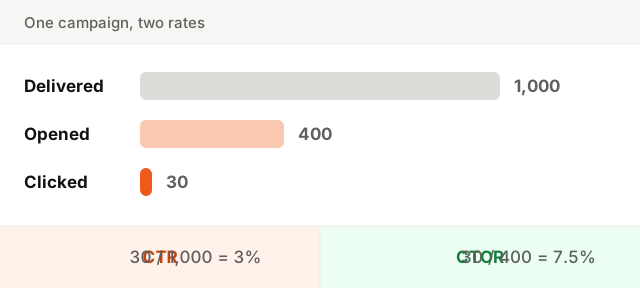
Click-through rate (CTR) is the share of delivered emails in which someone clicked at least one link. If 1,000 people received your email and 30 of them clicked, your CTR is 3%.
It answers a broad question: out of everyone this email reached, how many took the next step? Everything counts toward it: whether the email landed in the inbox, whether the subject got it opened, and whether the content made the link worth clicking.
CTR vs click-to-open rate (CTOR)
Most tools show a second number next to it. Click-to-open rate (CTOR) divides clicks by opens instead of by deliveries. It ignores everyone who never opened and asks a narrower question: of the people who saw the content, how many acted on it?
| Metric | Formula | What it tells you |
|---|---|---|
| Click-through rate (CTR) | Unique clicks / delivered × 100 | How the whole campaign performed, from inbox to click |
| Click-to-open rate (CTOR) | Unique clicks / unique opens × 100 | How convincing the content was once opened |
Use CTR to compare campaigns and to track performance over time. Use CTOR to judge the email body itself, for example when you change the layout or the call to action but keep the subject line.
How to calculate click-through rate
Take a product update sent to 2,500 users:
- 2,500 sent, 40 bounced, so 2,460 delivered
- 980 unique opens
- 74 unique clickers, who clicked 112 times in total
- 1Count unique clickers, not total clicks. Someone who clicks three links is one clicker. Here, 74.
- 2Divide by delivered emails. 74 / 2,460 = 0.030, so a CTR of 3.0%.
- 3Divide by unique opens for CTOR. 74 / 980 = 0.076, so a CTOR of 7.6%.
- 4Look at total clicks separately. 112 clicks from 74 people means some clicked more than once, which is useful for seeing which links got attention, but not for the rate.
Always divide by delivered, not sent. Bounces never reached anyone, and a list with a high bounce rate would otherwise look less engaging than it is.
How click tracking works
Email has no way to report clicks by itself. To count them, email tools rewrite every link in your email. Instead of pointing straight to your page, each link points to a tracking address that knows who received it and which link it was.
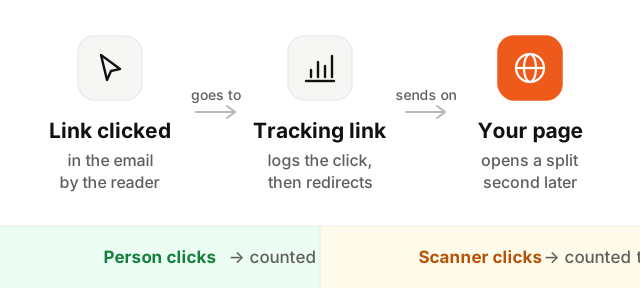
When someone clicks, their browser visits the tracking address first, the click is logged, and the browser is redirected to your real page. It takes a fraction of a second and the reader rarely notices.
By default, those tracking links use a domain shared by everyone on the same email tool. A custom tracking domain, such as links.yourcompany.com, makes the links match your brand. Readers who hover a link see your own domain, and spam filters judge the link domain on your reputation rather than on that of every other sender sharing it.
Bot clicks from security scanners
Clicks are far more reliable than opens, but they are not clean either. Many companies, and some mailbox providers, run link scanners: before an email reaches the inbox, a security system follows every link in it to check for malware or phishing. Each visit goes through your tracking link and is recorded as a click.
Typical signs of bot clicks:
- Clicks arriving within seconds of delivery, before any human could have read the email.
- Every link clicked in the same email, including the unsubscribe link and the logo.
- Clicks concentrated on business domains, where scanners are common.
- Clicks with no matching visit in your website analytics.
Some email tools filter likely bot clicks automatically. If yours does not, be careful with automations triggered by a click, such as "clicked the pricing link, notify sales". And remember that a scanner clicking the unsubscribe link is the reason good unsubscribe pages ask for a confirmation instead of acting on the first visit.
What is a good email click-through rate?
A common range for marketing emails is somewhere between 1% and 5% CTR, with click-to-open rates often in the 5% to 15% range. But the spread between industries, list sizes and types of email is wide, and benchmarks are averages of very different senders.
The type of email matters more than the industry. A password reset or a failed payment notice, with exactly one thing to do, can see a large share of recipients click. A weekly newsletter with ten articles will see far fewer. Onboarding emails usually sit in between, higher when they point to one clear next step in the product.
The benchmark that counts is your own: the same kind of email, to the same list, over time. A falling CTR on a stable list deserves a look at deliverability before anything else.
How to improve email click-through rate
- 1Give each email one job. Decide the single action you want and build the email around it. A secondary link is fine; five equal options are not.
- 2Make the call to action a button. A clear, high-contrast button with plenty of space around it is easier to see and to tap than a link inside a paragraph.
- 3Put it where people look. Place the main button early, where it is visible without scrolling, and repeat it at the end of a long email.
- 4Write link text that says what happens. "See your usage report" or "Update your card" beats "Click here" and "Learn more". People click when they know where they are going.
- 5Design for a phone. Most email is read on mobile. Use one column, readable text, and buttons big enough for a thumb.
- 6Personalize with real data. "You used 80% of your plan this month" earns more clicks than a generic upgrade pitch. Use what you know about each user.
- 7Segment the list. Send the feature announcement to the people who would use the feature. Smaller, relevant sends beat large, generic ones.
- 8Make sure it reaches the inbox. No one clicks in the spam folder. Read how to avoid the spam folder if your rates are dropping.
For more on structuring campaigns, see our email marketing best practices.
How to test for more clicks
A/B testing is how you find out which of these changes matter for your audience:
- Test one thing at a time. Button text, button color, placement, or email length, not all four at once.
- Choose the winner on clicks or conversions, not on opens. Apple's automatic opens hide the real difference between variants.
- Use a sample big enough to mean something. With a few hundred recipients per variant, a difference of two or three clicks is noise.
- Write down what you learned. One test is an anecdote; five tests that point the same way are a rule for your list.
Keep going
Click-through rate is the most honest everyday metric email has left. Watch CTR to compare campaigns, use CTOR to judge content, and keep an eye out for scanners.
Next, read why opens became unreliable in email open rate, and what keeps your emails out of the spam folder in how to avoid the spam folder. To confirm your domain is authenticated, run the Deliverability Setup Checker.