

On this page
- 1What is an email bounce rate?
- 2How to calculate your bounce rate
- 3Hard bounce vs soft bounce
- 4Common bounce codes and what they mean
- 5What is a good email bounce rate?
- 6Why bounces hurt your sender reputation
- 7How to handle bounces with a suppression list
- 8How to reduce your email bounce rate
- 9Check an address before you send
- 10Keep going
Every email you send gets an answer from the receiving server. Most of the time the answer is "accepted". Sometimes it is "no", and that "no" is a bounce. A few bounces are normal. Too many, and inbox providers start to wonder whether you know who you are emailing.
This guide covers how to calculate your bounce rate, the difference between hard and soft bounces, what the most common bounce codes mean, what a healthy rate looks like, and how to keep yours low.
What is an email bounce rate?
A bounce is an email the receiving server refused to deliver. The server sends back a status code explaining why: the address does not exist, the mailbox is full, the message was blocked.
Your bounce rate is the share of emails you sent that bounced. It is one of the clearest signs of list quality you have, because unlike open rates, it is not distorted by privacy features. An address either accepts mail or it does not.
How to calculate your bounce rate
The formula is simple:
Bounce rate = bounced emails ÷ emails sent × 100
Send a campaign to 10,000 people, get 150 bounces, and your bounce rate is 1.5%. Some tools split this into a hard bounce rate and a soft bounce rate, which is more useful, since the two call for different actions. Measure per send and per segment: a 0.5% average can hide one imported segment bouncing at 8%.
Hard bounce vs soft bounce
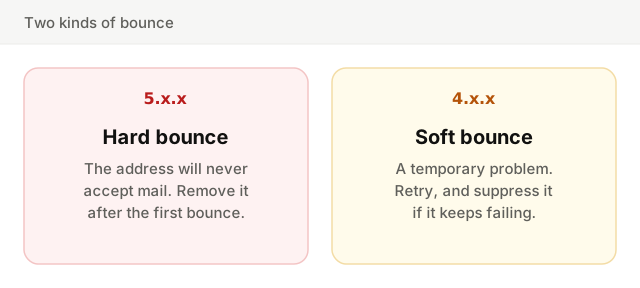
A hard bounce is permanent. The address does not exist, the domain does not exist, or the server will never accept mail for it. Its code starts with 5. Sending to it again will fail again, and every retry tells the provider you are not paying attention.
A soft bounce is temporary. The mailbox is full, the server is down, or the receiver is slowing you down for a while. Its code starts with 4. The sending server usually retries automatically for a period before giving up.
There is a third case worth separating: the block. A message refused for policy reasons (your reputation, your content, missing authentication) comes back with a 5.x.x code, but the address itself may be perfectly fine. Treating blocks as dead addresses hides the real problem.
Common bounce codes and what they mean
Bounce messages carry a three-digit SMTP reply code and, usually, an enhanced status code like 5.1.1. The first digit says permanent (5) or temporary (4); the rest narrows down the reason.
| Code | Type | What it means | What to do |
|---|---|---|---|
550 5.1.1 | Hard | The mailbox does not exist | Suppress the address at once |
550 5.1.2 | Hard | The domain does not exist or has no mail server | Suppress; often a typo like gmial.com |
452 4.2.2 | Soft | The mailbox is full | Retry; suppress if it persists |
421 4.7.0 | Soft | Temporary deferral, try later | Let the retries run; check your volume |
550 5.7.1 | Block | Refused by policy, often reputation or content | Find the cause, do not just suppress |
550 5.7.26 | Block | Gmail: the message failed authentication | Fix SPF, DKIM and DMARC |
4.x.x (other) | Soft | A temporary problem of some kind | Retry; watch for patterns |
Wording varies between providers, and some return a full mailbox as a permanent 5.2.2. Read the text that comes with the code: it often names the exact reason, and sometimes links to the provider's own explanation.
What is a good email bounce rate?
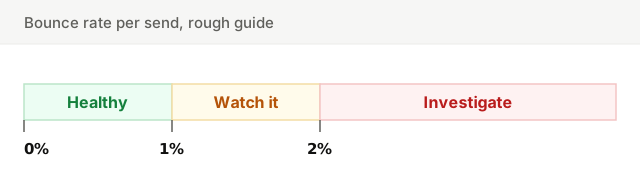
For a list built from real signups, a bounce rate under 1% per send is a good sign. The figure most often quoted as the limit is 2%: above it, stop and find out why before the next send. These are rough guides, not rules, and they vary by industry and list. A B2B list decays faster than a consumer one, because people change jobs and their work addresses die.
More useful than any benchmark is your own trend. A list that usually bounces at 0.4% and suddenly hits 1.5% has a problem, even though 1.5% looks acceptable on paper.
Why bounces hurt your sender reputation
A real person who signed up last month rarely has a dead address. So when a large share of your sends bounce, providers draw the obvious conclusion: the list is old, was bought, or was scraped. That lowers your sender reputation, and a lower reputation means more of your mail goes to spam, including the mail to perfectly valid addresses.
Dead addresses carry another risk. Some providers turn long-abandoned addresses into spam traps: after a period of rejecting mail, the address starts accepting it again, purely to catch senders who never clean their list. Hitting one is worse than a bounce.
How to handle bounces with a suppression list
A suppression list is the list of addresses you must never email again: hard bounces, spam complaints, unsubscribes. Every send checks it first. It is the single most important habit for keeping bounces low.
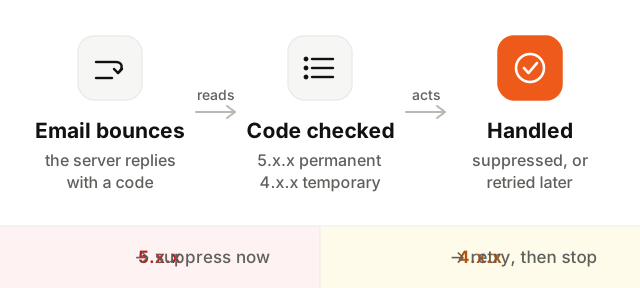
- 1Capture every bounce. Your sending service reports bounces by webhook or in its logs. Make sure they reach your contact list, including bounces that arrive minutes after the send.
- 2Read the code. Sort each bounce into hard, soft or block from the status code and its text.
- 3Suppress hard bounces after the first one. No second attempt. The address is dead.
- 4Count soft bounces. Suppress an address after several consecutive soft bounces, across sends or days.
- 5Investigate blocks. A wave of 5.7.x codes from one provider is a reputation or authentication problem, not a list problem.
- 6Keep the suppression list forever. Re-importing an old CSV must never bring suppressed addresses back.
How to reduce your email bounce rate
- Use double opt-in. A confirmation email proves the address exists and belongs to the person who typed it.
- Catch typos at signup. Suggest
gmail.comwhen someone typesgmial.com, and reject addresses with no valid domain. - Verify imported lists before sending. Any list you did not collect yourself recently deserves a check first.
- Never buy or rent lists. They are full of dead addresses and traps, and the people on them never asked for your mail.
- Send regularly. A list you mail every month stays fresh. A list left alone for a year comes back bouncing.
- Sunset the inactive. Addresses that have not engaged in months are the ones most likely to die next. See email list hygiene.
- Fix your authentication. Blocks for failed SPF, DKIM or DMARC look like bounces in your reports. Check them with the deliverability setup checker.
Check an address before you send
Unsure about a single address, or a few from a sales lead? Check whether the domain accepts mail and whether the address looks deliverable.
Verification lowers bounces, but it cannot replace consent. An address that exists and never asked for your email is still a complaint waiting to happen.
Keep going
Bounces are the visible tip of list quality. To clean the rest, read the email list hygiene guide. To see how bounces fit with complaints and engagement, read sender reputation and the broader email deliverability guide. And if the bounces are blocks, start with your authentication: SPF, DKIM and DMARC.